
Productivity

Engineering teams are more distributed than ever. Nearly 70% of active engineering positions are open to remote applicants, and many companies have a mix of remote, hybrid, in-person, and contracted employees. So, how do engineering leaders measure performance uniformly across all of these teams? By creating a framework for understanding performance, asking the right questions, and using data to answer them.
Creating a Performance Framework
Engineering leaders want to mitigate surprises before they impact software delivery or the business. It’s not enough to make decisions based on gut feel or anecdotal performance reviews — especially when an engineering organization is made up of multiple teams with unique working styles and deliverables. To truly understand performance across teams, leaders must establish which metrics are important to their company and create a framework to measure them. Establishing a performance framework ensures that leaders are measuring engineering teams in a consistent and equitable way so they can identify and resolve bottlenecks faster to optimize the flow of work.
Tailoring a Framework for Your Team
Using a common framework like DORA is a great starting point, but leaders must tailor measurement to the needs of their unique team. Traditional engineering metrics, and even frameworks like DORA, can overrotate on the quantity of code that’s produced and underrotate on the quality of that code, how efficiently it was written, or how effectively it solves a specific problem. Solely measuring quantity can result in bloated, buggy code because engineers may prioritize simple features they can get out the door quickly rather than spending time on more complex features that can move the needle for the business.
Adding metrics and context that apply to your specific team can provide a more accurate look at engineering performance. For example, to understand team productivity, leaders may look at engineering metrics like Mean Lead Time for Change (MLTC) alongside Cycle Time. If MLTC is high, it could indicate that Cycle Time is also high. These metrics can be viewed in tandem with other metrics like Time to Open, Time to Merge, and Time to First Review to understand where changes need to be made. These metrics can then be compared across teams to understand which teams are performing well and establish best practices across the organization.
Monthly Engineering Metrics to Understand Team Performance
Data-driven insights can provide engineering leaders with objective ways to evaluate developer competency, assess individual progress, and spot opportunities for improvement. While quarterly KPIs and annual performance reviews are great goalposts, managers are constantly thinking about how their teams are progressing toward those targets. Reviewing engineering metrics on a monthly basis is a good way to assess month-over-month progress and performance fluctuations on an individual level and a team level. Which metrics a team considers depends on its defined framework and overall company goals. Here are a few to consider:
PRs Merged vs. PRs Reviewed
Looking at these metrics together can show how the two key responsibilities of writing and reviewing code are spread across a team.
Review Coverage vs. Review Influence
This helps leaders understand what amount of thoroughness of Code Reviews results in a desired action.
Review Cycles vs. Cycle Time
To understand the effect that back-and-forth cycles in Code Review have on shipping speed, leaders can look at Review Cycles vs. Cycle Time.
Impact vs. Rework
Comparing Impact and Rework will show which teams are making the most significant changes to the codebase and how efficiently they are doing so.
Communicating Engineering Team Performance
Understanding and communicating engineering team performance is an effective way to ensure teams are aligned and that all requirements are understood and met. Making this a standard across the engineering organization — especially in a distributed or hybrid environment — is essential to its success. How leaders communicate their findings is equally important as gathering the information. When feedback is a fundamental part of a blameless team culture, team members understand that feedback is critical to growing as a team and achieving key goals, and will likely feel more secure in sharing ideas, acknowledging weaknesses, and asking for help. Leaders can tailor the questions listed above to meet the unique needs of their organizations and use engineering metrics as a way to understand, communicate, and improve team performance.

To deliver innovative products and experiences, engineering teams must work efficiently without compromising quality. Over the years, the software development lifecycle (SDLC) has evolved to include code reviews to ensure this balance. But, as engineering teams grow, so can the complexity of the review process. From understanding industry benchmarks to improving alignment across teams, this article outlines strategies that large engineering organizations can use to optimize Review Cycles.
Understanding Pull Request Review Cycles
The Review Cycles metric measures the number of times a Pull Request (PR) goes back and forth between an author and a reviewer. The PR review process is an essential component of PR Cycle Time, which measures the time from when the first commit in a PR is authored to when it’s merged. Leaders use this data to understand how long it takes to deliver innovation and establish baseline productivity for engineering teams.
Consider a PR for a new feature. Before the PR gets merged, it must be reviewed by a member of the team. If the PR gets approved and merged in a single cycle with no further interaction from the author, then the Review Cycle count is one. If the PR is not approved and requires changes, then the author must make an additional commit. The reviewer then checks the new version before it’s approved. In this scenario, the number of Review Cycles is two. This number increases as the PR is passed back and forth between the author and the reviewer.
By evaluating engineering metrics across enterprise companies, Code Climate identified a pattern in high-performing teams. Research found that the top 25% of organizations have an average of 1.1 Review Cycles, whereas the industry average is 1.2 cycles. When Review Cycles surpass 1.5, it’s time to investigate why.
What Causes a High Number of Review Cycle?
A high number of Review Cycles in engineering might stem from a combination of challenges that hinder the efficiency of the process. These include differing interpretations of what constitutes "done," misalignment between the expected changes and the actual changes resulting from the review, or conflicting views on the best approach to implement a solution. If there are anomalies where Review Cycles are high for a particular submitter, it could indicate they’re struggling with the codebase or aren’t clear about the requirements. This presents an opportunity for leadership to provide individualized coaching to help the submitter improve the quality of their code.
The first step in addressing a high number of Review Cycles is to identify the reason PRs are being passed back and forth, which requires both quantitative and qualitative information. By looking at Review Cycles alongside other PR metrics, leaders can look for correlations. For example, Review Cycles tend to be high when PR Size is high. If this is true in your organization, it might be necessary to re-emphasize coding best practices and encourage keeping PRs small.
Leaders might also want to do a closer review of PR data to understand which PRs have the highest Review Cycles. They can bring this information to the teams working on those PRs to uncover what exactly is causing the PRs to bounce around in review. Maybe there’s a misalignment that can be worked through, or requirements are shifting while the project is in progress. Leaders can work with teams to find solutions to limit the number of times PRs are volleyed back and forth by establishing expectations for reviews, how solutions should be implemented, and when a review is complete. Best practices for the PR review process should be documented and referenced by all team members.
Optimizing Pull Request Reviews to Meet Business Goals
For large engineering organizations, paying attention to Review Cycles is essential. Keeping Review Cycles low can boost efficiency, productivity, and innovation by minimizing delays and facilitating swift project progression. In addition, when Review Cycles are high, it can be a signal of a bigger issue that needs to be addressed, like a misalignment within a team, or a failure to maintain best practices.

Google Cloud’s DevOps Research and Assessment (DORA) team’s 2023 Accelerate State of DevOps report examines the relationship between user-facing strategies, process enhancements, and culture and collaboration and its impact on engineering performance.
The DORA team re-emphasizes the importance of the four key DORA metrics, important benchmarks for gauging the speed and stability of an engineering organization. These metrics are a baseline for any engineering team looking to improve, and are a gateway for a more data-driven approach to engineering leadership. Pairing DORA metrics with other engineering metrics can unlock critical insights about a team’s performance.
However, the 2023 report makes significant strides in broadening out their approach to measurement. It recognizes that the four foundational metrics are an essential starting point, but also highlights additional opportunities for enhancing engineering performance. As teams continue on their data-driven journey, there are more dimensions of team health to explore, even in areas that don’t initially seem like they would lend themselves to measurement.
Two such areas highlighted in this year’s report are code review — an important window into a team’s ability to communicate and collaborate — and team culture.
Faster Code Reviews Accelerate Software Delivery
Notably, the report’s most significant finding indicates that accelerating the code review process can lead to a 50% improvement in software delivery performance. While many development teams are disappointed with their code review processes, they simultaneously recognize their importance. Effective code reviews foster collaboration, knowledge sharing, and quality control. And, according to the report, an extended time between code completion and review adversely affects developer efficiency and software quality.
At Code Climate, we’ve identified a few key strategies for establishing an effective code review process. First, it’s important for teams to agree on the objective of review. This ensures they know what type of feedback to provide, whether it’s comments pertaining to bug detection, code maintainability, or code style consistency.
It’s also important for leaders to create a culture that prioritizes code review. Ensure that your teams understand that in addition to ensuring quality, it also facilitates knowledge sharing and collaboration. Rather than working in a silo to ship code, developers work together and help each other. Outlining expectations — developers are expected to review others’ code, in addition to writing their own — and setting targets around code review metrics can help ensure it’s a priority.
Code Review Metrics
Leaders at smaller companies may be able to understand the workings of their code review process by talking to team members. However, leaders at enterprises with large or complex engineering teams can benefit from using a Software Engineering Intelligence (SEI) platform, like Code Climate, to act on DORA’s findings by digging into and improving their code review processes.
An SEI platform offers essential metrics like Review Speed, which tracks the time it takes from opening a pull request to the first review submission, and Time to First Review, which represents the average time between initiating a pull request and receiving the first review. These metrics can help leaders understand the way code is moving through the review process. Are PRs sitting around waiting for review? Are there certain members of the team who consistently and quickly pick PRs up for review?
Reviewing these metrics with the team can help leaders ensure that team members have the mindset — and time in their day — to prioritize code review, and determine whether the review load is balanced appropriately across the team. Review doesn’t have to be completely equally distributed, and it’s not uncommon for more senior team members to pick up a greater proportion of PRs for review, but it’s important to ensure that the review balance meets the team’s expectations.
A Note About Bottlenecks
The DORA report noted that even if code reviews are fast, teams are still unlikely to improve software delivery performance if speed is constrained in other processes. "Improvement work is never done,” the report advises, “find a bottleneck in your system, address it, and repeat the process."
Data from an SEI platform can help leaders continue the work of identifying and removing bottlenecks. Armed with the right information, they can enhance visibility and support informed decision-making, enabling them to detect bottlenecks in the software development pipeline and empower developers to collaborate on effective solutions. Equipped with the right data, leaders can validate assumptions, track changes over time, identify improvement opportunities upstream, scale successful processes, and assist individual engineers in overcoming challenges.
Fostering a Healthy Team Culture
Though the DORA team highlights the importance of effective processes, it also found that culture plays a pivotal role in shaping employee well-being and organizational performance. They found that cultivating a generative culture that emphasizes belonging drives a 30% rise in organizational performance. Additionally, addressing fair work distribution is crucial, as underrepresented groups and women face higher burnout rates due to repetitive work, underscoring the need for more inclusive work cultures. To retain talent, encourage innovation, and deliver more business value, engineering leaders must prioritize a healthy culture.
Just as they can provide visibility into processes, SEI platforms can give leaders insight into factors that shape team health, including leading indicators of burnout, psychological safety, and collaboration, and opportunities for professional development.
It’s fitting that the DORA report identifies code review as a process with a critical link to team performance – it’s a process, but it also provides insight into a team’s ability to collaborate. Metrics like Review Speed, Time to first Review, and Review Coverage, all send signals about a team’s attitude toward and facility with collaboration.
Other data can raise flags about team members who might be headed towards burnout. The Code Climate platform's Coding Balance view, for example, highlights the percentage of the team responsible for 80% of a team’s significant work. If work is uneven — if 10% of the team is carrying 80% of the load — it can indicate that some team members are overburdened while others are not being adequately challenged.
Data is the Key to Acting on DORA Findings
The findings from the DORA report are clear: even those teams that are successfully using the four DORA metrics to improve performance should look at other dimensions as well. Prioritizing process improvements like code reviews and promoting a healthy team culture are instrumental to performance — and data can help leaders learn more about these aspects of their team. Request a consultation to find out more about using an SEI platform to action the 2023 DORA findings.

EverQuote prides itself on having a data-driven culture. But even with this organization-wide commitment, its engineering team initially struggled to embrace metrics that would help them understand and improve performance. Many leaders would give up after a failed attempt, but Virginia Toombs, VP of Engineering Operations, took a step back to understand what went wrong so they could try again — and succeed.
Along the way, the EverQuote team learned what to avoid when implementing engineering metrics and how to successfully roll them out. For them, it was all about empowering team members, collecting actionable data in the right platform, and correlating metrics for a more holistic view of what was happening across the organization.
Lessons Learned About Measuring Engineering Productivity
When EverQuote decided to measure engineering productivity a few years ago, it started by purchasing a tool, like many organizations commonly do. But it encountered problems as it hadn’t considered what to measure or how to leverage those insights to improve performance. Because EverQuote didn’t know which engineering metrics best suited its unique team and processes, it ended up with a tool that didn’t have mature throughput or flow metrics — two things it would learn were core to its success. The result? Virginia and her team saw detailed engineering metrics but lacked a comprehensive view of the organization’s performance.
This issue caused a domino effect. Measuring only granular metrics made team members feel that individual performance was being judged, rather than the process itself, and enthusiasm for the program came to a halt. That’s when the engineering operations team decided to rethink the approach and start from scratch.
Using Metrics to Improve Developer Experience
EverQuote’s engineering operations team is a central function within engineering whose main goal is to create an environment where engineers can thrive. This team optimizes processes, encourages collaboration, and coaches on agile techniques. For them, it’s essential to understand how engineering processes are performing so they can make data-driven decisions to improve. This team made two important decisions when rolling out engineering metrics for the second time.
First, they took the time to understand which engineering metrics applied to their organization. Rather than starting with granular metrics, they decided to lead with the big picture, adopting the four original DORA metrics: Deployment Frequency (DF), Mean Lead Time for Changes (MLTC), Mean Time to Recover (MTTR), and Change Failure Rate (CFR). From these high-level metrics, they would still be able to identify bottlenecks or issues and drill down into more granular metrics as needed.
To support DORA, and to provide visibility into its corresponding metrics, EverQuote adopted Code Climate. With Code Climate's Software Engineering Intelligence platform, they could identify organizational trends, look at data by teams or applications, and dig into specific DORA metrics. For example, if they see that MLTC is high, they can click into it to see exactly where the holdup is — maybe a long Time to Open or Time to First Review is preventing the PRs from getting to production as expected. Starting at a high level helps them understand their systems holistically, and then they can drill down as needed, which is more efficient and saves team members from metric fatigue.
Second, they empowered teams to own their metrics by educating them in how to read and interpret the data, and creating processes to discuss performance at the end of a sprint. They held these conversations as a team, not during one-on-ones, and focused on how they could better collaborate to improve as a unit. This strategy exemplifies one of EverQuote’s core principles: If you work as a team, you succeed as a team.
Successfully Implementing DORA DevOps Metrics
The EverQuote journey to measurement has come full circle. Now, engineers embrace engineering metrics as a tool for continuous improvement. After two iterations of implementing metrics, the team has learned three major lessons for successful adoption:
- Collect data you plan to act on. Although measuring and tracking every possible engineering metric may be tempting, it can prevent you from seeing the forest for the trees. Instead, be intentional about the metrics that your organization can derive insights from to take action.
- Correlate metrics and drill down as needed. Measuring DORA metrics gives EverQuote a full view of how engineering systems work at any given time. Being able to double-click into them in Code Climate's platform lets them quickly identify and resolve the root cause of an issue when it arises.
- Use consistent data. EverQuote has 17 engineering teams spread across multiple functions and locations. To maintain consistency, they align on how metrics will be defined and calculated. This process is essential to ensure they speak the same language and can benchmark against other teams and the industry.
Combining DORA DevOps metrics with other engineering metrics in Code Climate's insights platform has helped EverQuote nurture its data-driven culture. To learn more about successfully rolling out engineering metrics within your organization, request a consultation.

Objective data is a necessary complement to engineering leadership. By digging into the key metrics of the Software Development Life Cycle (SDLC), leaders can better assess and improve engineering processes and team performance.
Each organization may choose to focus on a different set of engineering metrics based on their goals. Our collaboration with thousands of organizations has revealed a key set of metrics that have proven valuable time and again, including Review Cycles, a key factor in Pull Request (PR) Cycle Time.
In this blog, we’ll dig into the importance of the Review Cycles metric, what it can tell you about the health of your teams and processes, and how to improve it.
What is the Review Cycles metric?
The Review Cycles metric refers to Pull Request reviews, and measures the number of times a PR goes back and forth between an author and reviewer.
The Pull Request review process is an essential component of PR Cycle Time, which measures the time from a first commit in a pull request being authored to when that PR is merged, and looking at Pull Request data can help leaders understand teams’ Time to Market and baseline productivity over time.
Whether the PR is created to ship a new feature or fix a bug, for example, the proposed change needs to be reviewed by a member of the team before it is merged. If that PR gets approved and merged with no further interaction from the author, then the Review Cycle is 1 — the changes were reviewed and approved in a single cycle.
If a PR does not get approval and requires changes, then the author must make an additional commit. The reviewer then checks the new version before it is approved. In this scenario, the number of Review Cycles is 2. Of course, this number increases as the PR is passed back and forth between author and reviewer.
Why should teams measure Review Cycles?
Pull Requests require software engineers to context switch and focus on one particular line of work. When this happens often, and Review Cycles are high, the PR review process can spread engineers’ attention too thin. It can also become a bottleneck to shipment.
Finding the cause of a slow PR review process
There are various reasons why Review Cycles may be high:
- There are differing ideas around what “done” means.
- There’s misalignment around what kind of changes are expected to come out of a review process, or
- There are conflicting opinions about how a solution should be implemented.
If the Review Cycle metric is high for a particular submitter, it could mean that they’re struggling with the codebase or dealing with unclear requirements.
Be mindful of potential biases in the PR review process
While data can offer a concrete number of Review Cycles for a specific PR, it does not tell the whole story. If a specific developer has a high number of Review Cycles tied to their work, engineering leaders should open a dialogue with both the developer and reviewer to pinpoint potential cause.
Sure, they may be struggling with the codebase because they are new to it, but it’s also possible that their teammates may be unfairly scrutinizing their work. There are a number of potential biases that could be skewing perception of ICs and their work. One engineering leader was able to use data from Code Climate's platform to uncover that a woman engineer’s PRs were moving disproportionately slower than those of her male counterparts and concluded that bias was a problem within the team.
To identify what’s affecting your teams’ Review Cycles and PR review process overall, examining the data will give you a starting point to have a conversation with the team and ICs involved so you can align on processes.
Review Cycles can help leaders assess onboarding and Ramp Time
When a developer first joins a team, it may take time for them to get up to speed. Looking at Review Cycles in a Software Engineering Intelligence (SEI) platform allows leaders to observe changes and progress over time. With these insights, you can measure the ramp time for newly onboarded engineers by observing whether their Review Cycles decrease over time. If Review Cycles for new hires are not decreasing at the expected rate, leaders may want to further investigate the efficacy of onboarding processes and ensure that new developers have the tools they need to excel in their roles.
Using data to improve Review Cycles and help engineers get unstuck
When you use a Software Engineering Intelligence (SEI) platform like Code Climate, you can gain visibility into the entire PR review process. The Analytics module in Code Climate's platform is a good place to investigate PR review processes. You’ll want to run a query for Review Cycles, or the number of times a Pull Request has gone back and forth between the author and reviewer. Here’s how:
Click on the arrow next to the Review Cycle number to see all of Hecate’s individual PRs from the selected timeframe. Sort the number of Review Cycles from high to low and start with the ones that have been open the longest. In this case, the top two PRs, which have both undergone 4 Review Cycles and are still open, are worth bringing to a standup, retro, or 1-on-1.
Talk to your team to improve your PR review process
Prepare for a standup, retro, or 1-on-1 with developers by taking a look at Pull Request data. This will allow you to be more informed ahead of a meeting, and be able to focus specifically on units of work rather than developers or teams themselves.
Ask your team questions about specific PRs with high Review Cycles to uncover where the misalignment is happening. Work with the team to find solutions to limit the amount of times a PR is volleyed back and forth by establishing what is expected in a review, how solutions should be implemented, and when a review is complete. Document best practices for the Pull Request review process to use as a reference in the future.
How many Review Cycles should you target in the PR review process?
Code Climate has produced proprietary benchmarks that engineering leaders can use. We have found that the top 25% of organizations have an average of 1.1 Review Cycles or less, whereas the industry average is 1.2 cycles. If Review Cycles are above 1.5, it’s time to investigate why.
Review Cycles are one of many critical metrics that engineering leaders can measure to understand and improve team health and processes. By looking at Review Cycles alongside other Pull Request-related metrics, you can uncover the cause of a slowdown and make informed decisions towards improvement. The data is only a starting point, however — it’s essential that leaders speak directly to teams in order to find a sustainable solution.
Request a consultation to learn how measuring engineering metrics can lead to faster software delivery and healthier teams.
The DORA research group, (DevOps Research and Assessment), now part of Google Cloud, identified four key software engineering metrics that their research showed have a direct impact on the teams' ability to improve deploy velocity and code quality, which directly impacts business outcomes.
The four outcomes-based DORA metrics include two incident metrics: Mean Time to Recovery (MTTR) (also referred to Time to Restore Service), and Change Failure Rate (CFR), and two deploy metrics: Deployment Frequency (DF) and Mean Lead Time for Changes (MTLC).
Gaining visibility into these metrics offers actionable insights to balance and enhance software delivery, so long as they are considered alongside other key engineering metrics and shared and discussed with your team.
The Mean Time to Recovery metric can help teams and leaders understand the risks that incidents pose to the business as incidents can cause downtime, performance degradation, and feature bugs that make an application unusable.
What is Mean Time to Recovery?
Mean Time to Recovery is a measurement of how long it takes for a team to recover from a failure in production, from when it was first reported to when it was resolved. We suggest using actual incident data to calculate MTTR, rather than proxy data which can be fallible and error-prone, in order to improve this metric and prevent future incidents. While the team may experience other incidents, MTTR should only look at the recovery time of incidents that cause a failure in production.
Why is Mean Time to Recovery Important?
Even for high-performing teams, failures in production are inevitable. MTTR offers essential insight into how quickly engineering teams respond to and resolve incidents and outages. Digging into this metric can reveal which parts of your processes need extra attention; if you’re delivering quickly but experiencing frequent incidents, your delivery is not balanced. By surfacing the data associated with your teams’ incident response, you can begin to investigate the software delivery pipeline and uncover where changes need to be made to speed up your incident recovery process.
Recovering from failures quickly is key to becoming a top-performing software organization and meeting customer expectations.
What is a good Mean Time to Recovery?
Each year, the DORA group puts out a state of DevOps report, which includes performance benchmarks for each DORA metric, classifying teams as high, medium, and low-performing. One of the most encouraging and productive ways to use benchmarking in your organization is to set goals as a team, measure how you improve over time, and congratulate teams on that improvement, rather than using “high,” “medium” and “low” to label team performance. Additionally, if you notice improvements, you can investigate which processes and changes enabled teams to improve, and scale those best practices across the organization.
More than 33,000 software engineering professionals have participated in the DORA survey in the last eight years, yet the approach to DORA assessment is not canonical and doesn’t require precise calculations from respondents, meaning different participants may interpret the questions differently, and offer only their best assumptions about their teams’ performance. That said, the DevOps report can provide a baseline for setting performance goals.
The results of the 2022 State of DevOps survey showed that high performers had a Mean Time to Recovery of less than one day, while medium-performing organizations were able to restore normal service between one day and one week, and low-performing organizations took between one week and one month to recover from incidents. For organizations managing applications that drive revenue, customer retention, or critical employee work, being a high performer is necessary for business success.
How To Improve Your Mean Time to Recovery
Visibility into team performance and all stages of your engineering processes is key to improving MTTR. With more visibility, you can dig into the following aspects of your processes:
Work in Progress (WIP)
A long MTTR could indicate that developers have too much WIP, and lack adequate resources to address failures.
Look at Other Metrics and Add Context
One of the benefits of using a Software Engineering Intelligence (SEI) platform is that you can add important context when looking at your MTTR. An SEI platform like Code Climate, for example, allows you to annotate when you made organizational changes — like adding headcount or other resources — to see how those changes impacted your delivery.
You can also view DORA metrics side by side with other engineering metrics, like PR Size, to uncover opportunities for improvement. Smaller PRs can move through the development pipeline more quickly, allowing teams to deploy more frequently. If teams make PR Sizes smaller, they can find out what’s causing an outage sooner. For example, is debugging taking up a lot of time for engineers? Looking at other data like reverts or defects can help identify wasted efforts or undesirable changes that are affecting your team’s ability to recover, so you can improve areas of your process that need it most.
Improve Documentation
What did you learn from assessing your team’s incident response health? Documenting an incident-response plan that can be used by other teams in the organization and in developer onboarding can streamline recovery.
Set Up an Automated Incident Management System
To improve your team’s incident response plan, it’s helpful to use an automated incident management system, like Opsgenie or PagerDuty. With an SEI platform like Code Climate you can push incident data from these tools, or our Jira incident source, to calculate DORA metrics like MTTR. In Code Climate's platform, users can set a board and/or issue type which will tell the platform what to consider an “incident.”
Talk to Your Team
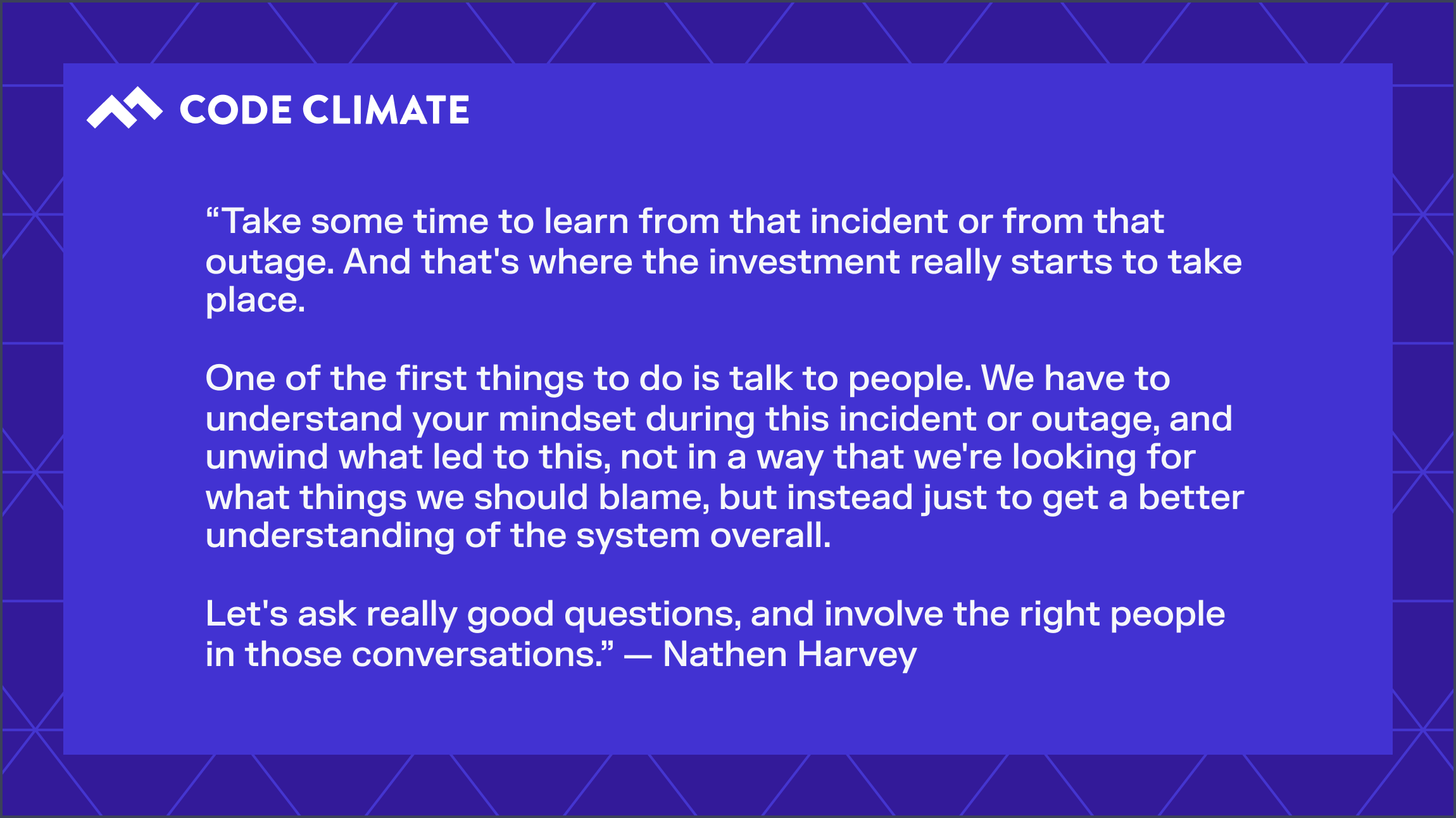
We spoke with Nathen Harvey, Developer Advocate at DORA and Google Cloud, for his perspective on how to best use DORA metrics to drive change in an organization. Harvey emphasized learning from incident recovery by speaking with relevant stakeholders.
Looking at DORA metrics like Mean Time to Recovery is a key starting point for teams who want to improve performance, and ensure more fast and stable software delivery. By looking at MTTR in context with organizational changes and alongside other engineering metrics, speaking with your team after an incident, and documenting and scaling best practices, you can improve MTTR overall and ultimately deliver more value to your customers.
Learn how you can use these metrics to enhance engineering performance and software delivery by requesting a consultation.

Engineering teams know that technical debt, or “tech debt,” is an inevitable, and often necessary, part of software development. Yet, it can be difficult to explain the significance of tech debt to stakeholders and C-suite leadership. While stakeholders might want to prioritize constant innovation over paying down tech debt, letting tech debt build up can ultimately slow down an engineering team. When that happens, it can be challenging to prove that the resulting delays and complications don't fully reflect an engineering team's adeptness.
What are the reasons an engineering team might accrue tech debt, and how can they overcome it before it impacts delivery?
What is technical debt?
Technical debt is a term used to describe the implications of immature code being pushed through the software development pipeline to expedite delivery. Because the code was merged prematurely, or was a quick fix to a complex problem, it often needs to be refactored or redone, resulting in a backlog of work that will need to be taken on at some point in the future.
The term "technical debt" was first coined by Ward Cunningham, who posited that "a little debt speeds development so long as it is paid back promptly with refactoring. The danger occurs when the debt is not repaid."
Tech debt can be thought of similar to financial debt. Taking out a loan for a larger purchase makes it possible to expedite the purchase, rather than waiting to save up a large sum of cash. In exchange, you must repay the loan plus interest, which builds up exponentially over time.
With technical debt, the interest is not only the extra developer time spent refactoring the code, but the consequences resulting from not addressing that refactoring early on. As the work builds up and other work is prioritized, going back to deal with the technical debt becomes increasingly costly and difficult. In this sense the time needed to address tech debt grows, similar to interest.
Reasons for accruing technical debt
First, it's important to note that technical debt is inevitable in order to remain competitive in the industry, and doesn't necessarily imply that an engineering team has done something "wrong."
Similar to financial debt, there are reasons for intentionally racking up technical debt. The marketplace today moves lightning fast and, to stay afloat, you might opt for shortcuts that lead to technical debt in order to ship new features quickly and bring in revenue.
The associated tech debt you take on might be worth it when you compare it against the downsides of waiting to bring your features to the market. This is completely normal — the danger arises when, as Cunningham said, the debt isn't properly repaid.
Why should you care about technical debt?
Instead of working on developing new features, engineers are often left to work through technical debt, further slowing innovation and impacting a slew of business outcomes.
Even while there are good reasons why organizations accrue tech debt, the earlier it’s addressed, the better. It’s vital for engineering leaders to pay attention to tech debt and be aware of the issues it can pose to the organization:
- Tech debt can curtail developer productivity; one study estimates that developers spend 23% of their working time on tech debt.
- Poorly maintained code can be complex for new developers to navigate. When developers take time to improve this code, it can contribute to the overall technical debt.
- Tech debt snowballs over time.
- The longer tech debt goes unaddressed, the more expensive it will be to resolve.
Overcome technical debt by getting curious
To minimize or overcome tech debt, start by investigating the source.
Engineering leaders can take a cue from one Code Climate customer, and use a Software Engineering Intelligence (SEI) platform — sometimes known as an Engineering Management Platform (EMP) — to demonstrate how tech debt can limit deployment. The engineering team at a popular crowdsourcing platform often worked with legacy code, and had nearly a decade’s worth of tech debt.
The company’s VP of Engineering had a relatively easy time getting developers on board to prioritize the backlog of tech debt. When it came to getting executive buy-in, however, the VP of Engineering needed concrete data to present to stakeholders in order to justify dedicating resources to refactoring the legacy code.
Using Code Climate's solutions, the engineering leader was able to demonstrate, in real time, how many Pull Requests (PRs) were left open for longer than is ideal while authors and reviewers sent comments back and forth. Code Climate's insights showed this as a lasting trend with high-risk PRs stacking up. They used this as evidence to executives that legacy code was significantly impacting deployment.
Once you outline how to tackle your current tech debt, think about how you can manage new debt going forward. Team leaders might decide to be mindful of high-risk PRs and monitor them over time to ensure that tech debt does not become insurmountable; or, you may have developers take turns refactoring legacy code while others put their efforts towards innovation. Use concrete evidence from an SEI platform to request additional resources. Once you find what works, you can scale those best practices across the organization.
Adopt a holistic approach to managing technical debt
Technical debt is inevitable, and even mature engineering teams will need a strategy for mitigating the debt they’ve accrued. Communicate with your company leadership about tech debt and its implications, work to find the root cause within your teams, and adopt a slow-but-steady approach towards a resolution.
You will never be able to address and solve all technical debt at once, but you can prioritize what to tackle first and move toward a more efficient future.
A Software Engineering Intelligence platform can provide the visibility leaders need to refine engineering processes. Request a consultation to learn more. Request a consultation to learn more.

The four DORA Metrics — Deployment Frequency, Change Failure Rate, Mean Time to Recovery, and Mean Lead Time for Changes — were identified by the DevOps Research and Assessment group as the metrics most strongly correlated to a software organization’s performance.
These metrics are a critical starting point for engineering leaders looking to improve or scale DevOps processes in their organizations. DORA metrics measure incidents and deployments, which can help you balance speed and stability. When viewed in isolation, however, they only tell part of the story about your engineering practices.
To begin to identify how to make the highest-impact adjustments, we recommend viewing these DORA metrics in tandem with their non-DORA counterparts, which can be done through Velocity’s Analytics module. These close correlations will help are a great starting point if you're looking for opportunities to make improvements, or might highlight teams that are doing well and might have best practices that could scale across the organization.
While there is no one-size-fits-all solution to optimizing your DevOps processes, certain pairings of metrics are logical places to start.
DORA Metric: Change Failure Rate
Velocity Metric: Unreviewed Pull Requests
Change Failure Rate is the percentage of deployments causing a failure in production, while Unreviewed Pull Requests (PRs) refers to the percentage of PRs merged without review (either comments or approval).
How can you identify the possible causes of high rates of failures in production? One area to investigate is Unreviewed PRs. Code review is the last line of defense to prevent mistakes from making it into production. When PRs are merged without comments or approval, you’re at a higher risk of introducing errors into the codebase.
In Velocity’s Analytics module, choose Unreviewed PRs and Change Failure Rate to see the relationship between the two metrics. If you notice a high Change Failure Rate correlates to a high percentage of Unreviewed PRs, you have a basis for adjusting processes to prevent Unreviewed PRs from being merged.
Engineering leaders may start by coaching teams to improve on the importance of code review so that they make it a priority, and if necessary, setting up a process that assigns reviews or otherwise makes it more automatic. If you’re using Velocity, you can note the date of this change right in Velocity in order to observe its impact over time. You can take this data to your team to celebrate successes and motivate further improvements.
For reference, according to the State of DevOps report for 2022, high-performing teams typically maintain a CFR between 0-15%.
DORA Metric: Deployment Frequency
Velocity Metric: PR Size
Deployment Frequency measures how frequently the engineering team is successfully deploying code to production, and PR Size is the number of lines of code added, changed, or removed.
Our research shows that smaller PRs pass more quickly through the development pipeline, which means that teams with smaller PRs are likely to deploy more frequently. If you’re looking to increase Deployment Frequency, PR size is a good place to start your investigation.
If you view these two metrics in tandem and notice a correlation, i.e. that a larger PR Size correlates to a lower Deployment Frequency, encourage your team to break units of work into smaller chunks.
While this may not be the definitive solution for improving Deployment Frequency in all situations, it is the first place you might want to look. It’s important to note this change and observe its impact over time. If Deployment Frequency is still trending low, you can look at other metrics to see what is causing a slowdown. Within Velocity’s Analytics module, you also have the ability to drill down into each deploy to investigate further.
DORA Metric: Mean Time to Recovery
Velocity Metric(s): Revert Rate or Defect Rate
Mean Time to Recovery (also referred to as Time to Restore Service) measures how long it takes an engineering team to restore service by recovering from an incident or defect that impacts customers.
Debugging could account for a significant amount of the engineering team’s time. Figuring out specifically which areas in the codebase take the longest time to recover could help improve your MTTR.
In Analytics, you can view MTTR and Revert Rate or Defect Rate by Application or Team. Revert Rate is the total percentage of PRs that are “reverts”— changes that made it through the software development process before being reversed — which can be disruptive to production. These reverts could represent defects or wasted efforts (undesirable changes). Defect Rate represents the percentage of merged pull requests that are addressing defects.
By viewing these metrics side by side in the module, you can see which parts of the codebase have the most defects or reverts, and if those correlate to long MTTRs (low-performing teams experience an MTTR of between one week and one month).
If you notice a correlation, you can drill down into each revert, speak to the team, and see whether the issue is a defect or an undesirable change. To prevent defects in the future, consider implementing automated testing and/or code review. To prevent wasted efforts, the solution may lie further upstream. This can be improved by focusing on communication and planning from the top down.
DORA Metric: Mean Lead Time for Changes
Velocity Metric: Cycle Time
Mean Lead Time for Changes is the time it takes from when code is committed to when that code is successfully running in production, while Cycle Time is the time between a commit being authored to a PR being merged. Both are speed metrics, and can offer insight into the efficiency of your engineering processes.
Low performing teams have an MLTC between one and six months, while high-performing teams can go from code committed, to code running in production in between one day and one week.
If your team is on the lower-performing scale for MLTC, it could indicate that your Cycle Time is too high or that you have issues in QA and testing. View these metrics in tandem in Velocity in order to check your assumptions. If your Cycle Time is high, you can dig deeper into that metric by investigating corresponding metrics, like Time to Open, Time to Merge, and Time to First Review.
Conversely, if your Cycle Time is satisfactory, the problem could lie with deployments. You should investigate whether there are bottlenecks in the QA process, or with your Deploy Frequency. If your organization only deploys every few weeks, for example, your team’s PRs could be merged but are not being deployed for a long time.
The power of DORA metrics in Analytics
DORA metrics are outcome-based metrics which help engineering teams identify areas for improvement, yet no single metric can tell the whole story of a team’s performance. It’s important to view DORA metrics with engineering metrics to gain actionable insights about your DevOps processes.
To learn more about using DORA metrics in Velocity, talk to a product specialist.
The four DORA metrics — Deployment Frequency, Change Failure Rate, Mean Lead Time for Changes, and Mean Time to Recovery — were identified by the DevOps Research & Assessment group as the four metrics most strongly statistically correlated with success as a company.
Within those four metrics, the institute defined ranges that are correlated with meaningfully different company outcomes. They describe companies based on the outcomes they achieve as “High Performing,” “Medium Performing,” or “Low Performing.”
Moving between categories — for example, improving your Deployment Frequency from “between once per month and once every six months” to “between once per month and once every week” — leads to a statistically significant change in the success of a business. Moving within a bucket (for example, from once per month to twice per month) may be an improvement, but was not shown to drive the same level of shift in outcome.
DORA calculations are used as reference points across the industry, yet, there is no agreed-upon approach for DORA assessment, or accurately measuring DORA metrics. To set the original performance benchmarks, the DORA group surveyed more than 31,000 engineering professionals across the world over a span of six years, but responses were not based on standardized, precise data.
DORA metrics have been interpreted and calculated differently for different organizations, and even for teams within the same organization. This limits leaders’ ability to draw accurate conclusions about speed and stability across teams, organizations, and industries.
Because of this, there are subtle pitfalls to using automated DORA metrics as performance indicators.
Code Climate Velocity measures DORA metrics with real data, as opposed to proxy data, for the most useful understanding of your team health and CI/CD processes.
Code Climate’s Approach to DORA Assessment
As mentioned, there are many different approaches to automating the measurement of the DORA metrics in the market. In order to enable engineering executives to understand how their organization is performing across the four DORA metrics, we wanted to provide the most accurate and actionable measurement of outcomes in Velocity.
Our approach relies on analytical rigor rather than gut feel, so engineering leaders can understand where to investigate issues within their software practices, and demonstrate to executives the impact of engineering on business outcomes.
Using Real Incident Data, Not Proxy Data for DORA Calculations
Not every platform tracks Incident data the same way; many platforms use proxy data, resulting in lower-quality insights. Velocity instead uses actual Incident data, leading to more accurate assessment of your DevOps processes.
Velocity can ingest your team’s Incident data directly from Jira and Velocity’s Incident API. These integrations provide a way for every team to track metrics in the way that most accurately reflects how they work.
The Most Actionable Data
We made it possible for engineering leaders to surface DORA metrics in Velocity’s Analytics module, so that customers can see their DORA metrics alongside other Velocity metrics, and gain a more holistic overview of their SDLC practices.
Teams can evaluate their performance against industry benchmarks, as well as between other teams within the organization, to see which performance bucket they fall under: high, medium, or low. Based on that information, they can scale effective processes across the organization, or change processes and measure their impact.
Balancing Speed with Stability: How Velocity Metrics Contextualize DORA Metrics
If teams evaluated DORA metrics in isolation and discovered that their teams have a high Deployment Frequency or that they deploy multiple times a day, they may still be considered “high performing” — yet we know this does not tell the whole story of their software delivery. Velocity metrics and other DORA metrics within the Analytics module help contextualize the data, so that teams can understand how to balance speed with stability.
For example, the Velocity Metric PR size (number of lines of code added, changed, or removed) can be a useful counterpoint to Deployment Frequency. If you view these metrics together in Velocity’s Analytics module, you can see a correlation between the two — does a low Deployment Frequency often correlate with a larger PR size? If so, leaders now have data-backed reasoning to encourage developers to submit smaller units of work.
This doesn’t necessarily mean that your Deployment Frequency will be improved with smaller PR sizes, but it does provide a starting point to try and improve that metric. Leaders can note when this change was implemented and observe its impact over time. If Deployment Frequency is improved, leaders can scale these best practices across the organization. If not, it’s time to dig deeper.
DORA Metrics Definitions
Deployment Frequency – A measurement of how frequently the engineering team is deploying code to production.
Deployment Frequency helps engineering leadership benchmark how often the team is shipping software to customers, and therefore how quickly they are able to get work out and learn from those customers. The best teams deploy multiple times per day, meaning they deploy on-demand, as code is ready to be shipped. The higher your Deployment Frequency, the more often code is going out to end users. Overall, the goal is to ship small and often as possible.
Mean Lead Time for Changes – A measurement of how long, on average, it takes to go from code committed to code successfully running in production.
Mean Lead Time for Changes helps engineering leadership understand the efficiency of their development process once coding has begun and serves as a way to understand how quickly work, once prioritized, is delivered to customers. The best teams are able to go from code committed to code running in production in less than one day, on average.
Change Failure Rate – The percentage of deployments causing a failure in production. If one or more incidents occur after deployment, that is considered a “failed” deployment.
Change Failure Rate helps engineering leaders understand the stability of the code that is being developed and shipped to customers, and can improve developers’ confidence in deployment. Every failure in production takes away time from developing new features and ultimately has negative impacts on customers.
It’s important, however, that leaders view Change Failure Rate alongside Deployment Frequency and Mean Lead Time for Changes. The less frequently you deploy, the lower (and better) your Change Failure Rate will likely be. Thus, viewing these metrics in conjunction with one another allows you to assess holistically both throughput and stability. Both are important, and high-performing organizations are able to strike a balance of delivering high quality code quickly and frequently.
Mean Time to Recovery – A measurement of how long, on average, it takes to recover from a failure in production.
Even with extensive code review and testing, failures are inevitable. Mean Time to Recovery helps engineering leaders understand how quickly the team is able to recover from failures in production when they do happen. Ensuring that your team has the right processes in place to detect, diagnose, and resolve issues is critical to minimizing downtime for customers.
Additionally, longer recovery times detract from time spent on features, and account for a longer period of time during which your customers are either unable to interact with your product, or are having a sub-optimal experience.
Doing DORA Better
Though there is no industry standard for calculating and optimizing your DORA metrics, Velocity’s use of customers’ actual Incident data, and ability to contextualize that data in our Analytics module, can help teams better understand the strengths and weaknesses of their DevOps process and work towards excelling as an engineering organization.
Interested in learning which performance benchmark your team falls under, and how you can scale or alter your engineering processes? Reach out to a Velocity specialist.