

Sasha Rezvina

Formal code review is a recognized best practice within the software industry, for good reason, including:
- Providing newer developers an opportunity to receive feedback, ask for help, and make sure they’re on the right track
- Allowing experienced developers to keep an eye on code as it’s added to the codebase, and ensure it meets their organization’s standards
- Preserving and transferring institutional domain knowledge
That said, code review also has its issues. It can be cumbersome to perform, challenging to arrange, and difficult to standardize. We certainly found it to be a headache — and we love reviewing code! That’s why we built Code Climate: to automate as much of the review process as we can, in a way that seamlessly integrates with our pull request workflow.
Why build an automated code review process around pull requests? Because they make your life easier. A page with a URL that encompasses the code changes and the technical product discussions around a feature makes the intangible more tangible. It surfaces discussion that can otherwise be hard to access. It archives conversation and can serve as a valuable reference for new team members getting up to speed on how work gets done at your shop.
Previous solutions for this workflow problem would have your artifacts scattered all over the place — code changes in your version control system, comments in an issue tracker, and, of course, tons of email. Pull requests corral everything, and this improved locality is hugely convenient. They also allow you to attach media, engage in illustrative conversation, and signal that you simply like what you see. All of this enhances the code review process by helping to flesh out the impersonal nature of online, asynchronous communication. Plus, every developer knows what a pull request is and how they work.
Our pull request integration automatically scans your PRs for code quality and security issues. After you open a PR, Code Climate will update its status in GitHub, as seen in the screenshot below. Our status update provides a direct link back to the relevant branch comparison page, giving you a detailed analysis of how the PR branch compares to your default branch.
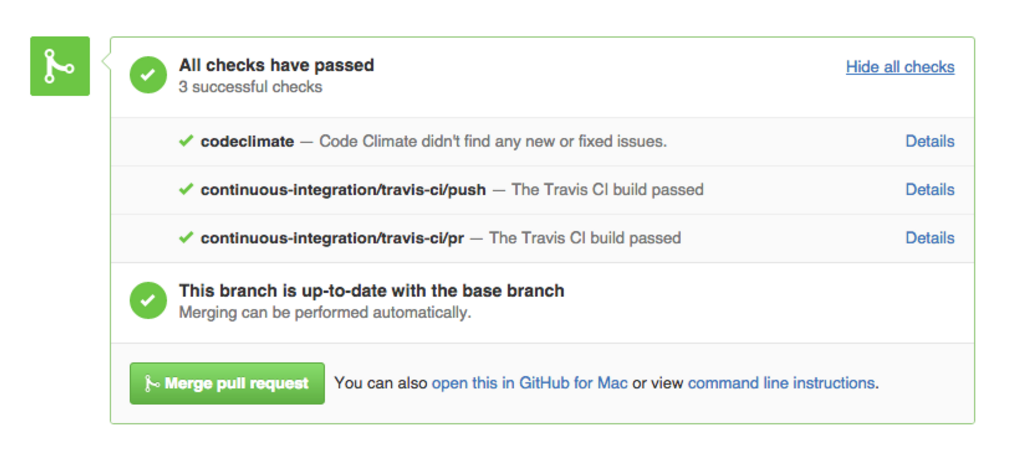
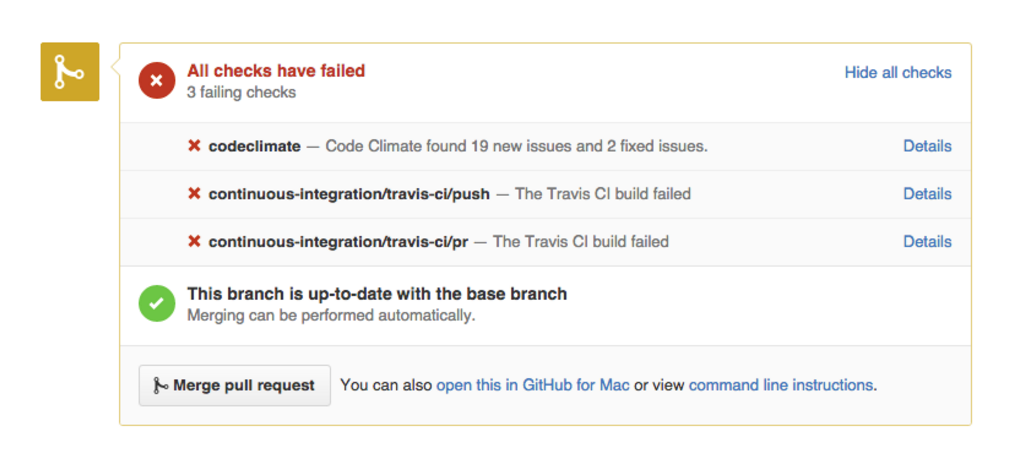
Code Climate automatically checks for consistent style, eliminating the need for developers to review this manually. In fact, your team standards will be enforced on every commit — your pull request will be marked “failed” if any new checks are found — ensuring consistency across your codebase.
Having an automated tool deliver information about code quality issues has benefits beyond time-saving. Everyone gets the same treatment from an automated analysis, and that’s a good thing for your team’s morale and for your code, with the kind of feedback that’s dismissed as “nitpicking” when provided by a team member generally well-received when delivered by a “bot”.
Combining the power of automated code review with a GitHub based pull request workflow works. When all communication is centralized, and developers aren’t sidetracked by tasks or feedback that can be automated easily, friction is reduced, confidence increases, and your output improves. Try it with your team — we think you’ll like it!

While developers love to let their opinions be known about how code should be formatted, the style of your company’s codebase isn’t something that should be left to personal taste. Even veteran code readers will experience frustration trying to mentally translate semantically equivalent statements between styles. It certainly raises the barrier to entry for new members of your team to have to learn multiple styles in order to learn or contribute to a project. The maintainability of any codebase is closely tied to how easily it can be understood, so ambiguity in this area is not desirable.
Code that adheres to a consistent style is easier to peruse, quicker to update, unlikely to start unnecessary debates, and focuses attention where it’s necessary — on the functionality and meaning.
Fortunately, style conventions are simple to mechanically enforce. That’s right, ensuring style consistency is a task that can largely be offloaded to external automated services or libraries, meaning that it’s work you and your team won’t have to do!
Here’s how you do it:
1) Choose your linter
The first step in implementing your style guide is to pick a linter. Linters provide all the benefit of style consistency with none of the wasted discussion time. Even better, the ones developed for specific programming languages — like our many linting engines — have the conventions of the community encoded right into the tool. However, because these tools offer a broad range of functionality, getting them integrated into your development process can be something of an art. Which brings us to step 2,
2) Integrate the linter into your development process
While there are several ways to manually integrate a linter, they tend to be cumbersome and require considerable ongoing effort. Command line tools which take a variety of parameters are annoying in their own right. Ensuring that developers run a tool locally is almost as burdensome as stylistic discussions. An alternative to running these tools yourself (or convincing your team to use them) is to instead take advantage of a service like Code Climate — either our hosted service or our free CLI — that allows you to configure the automated analysis to your liking and be ensured that everyone is being held to the same standard.
3) Configure your external services
Once you settle on a tool to automate style review for your chosen language, you can configure an external service to keep your pull request up-to-date with the output of this analysis. This will be the start of a tight feedback loop that will keep your team kicking ass.
4) Incorporate into your code review
A good rule of thumb for understanding how to think about code style in terms of code review is the following: Can it be automated? If the change being suggested has been agreed upon by the team, and can be trivially handled by a style linter, it’s simply not worth discussing. Just add the requirement to your linter configuration and move along.
5) Enjoy more maintainable code and a happier team that doesn’t spend each day arguing about semi-colons
Adhering to a style guide results in code that’s quickly understood and easier to maintain, and happier developers who no longer feel nit-picked over their personal style preferences. Automating that function ensures those standards are enforced consistently, and that your code’s health will continue to improve over time. It’s a win-win. If you haven’t tried it yet, we highly recommend you give it a go!

Software teams trying to improve the health of their codebase are often hindered by a lack of refactoring experience. Combine this with a mix of experience levels (both with the code and the domain), and differing style preferences, and it’s easy to understand how even well-intentioned teams find it hard to effect positive change.
There are a variety of techniques to help in these cases, but our favourite is “Mob Refactoring”. It’s a variant of Mob Programming, which is pair programming with more than two people and only one computer. This may sound like complete chaos — and we certainly don’t recommend working like this all the time — but it can be a very effective approach for leveling up the refactoring abilities of the team and establishing shared conventions for style and structure of code.
Here’s how it works:
1) Assemble the team for an hour around a computer and a projector. We recommend ordering food and eating lunch together — your long-term code quality goals will only be helped if there’s a positive association between refactoring and delicious food.
2) Bring an area of the codebase that’s in need of refactoring. Have one person drive the computer, while the rest of the team navigates.
3) Attempt to collaboratively refactor the code as much as possible within the hour.
4) Don’t expect to produce production-ready code during these sessions. The value of the exercise is in the conversations that take place, not the resulting commits.
5) Stick to your one hour timbebox and, when you’re done, throw out the changes. Under no circumstances try to finish the refactoring after the session — it’s an easy way to get lost in the weeds.
Do this a few times, and rotate the area of focus and the lead each week. Start with a controller, then work on a model, or perhaps a troublesome view. Give each member of the team a chance to select the code to be refactored and drive the session. Even the least experienced member of your team can pick a good project — and they’ll probably learn more by working on a problem that is on the top of their mind.
Mob Refactoring sessions provide the opportunity for less experienced members of the team to ask questions like, “Why do we do this like that?”, or for more senior programmers to describe different implementation approaches that have been tried, and how they’ve worked out in the past. These discussions help close the experience gap and often lead to a new consensus about the preferred way of doing things.
If you have a team that wants to get better at refactoring, but experience and differing style patterns are a challenge, give Mob Refactoring a try. It requires little preparation, and only an hour of investment, but the impact can be massive.

If you’ve spent any amount of time working with software professionally, chances are you’ve experienced the vicious cycle of development (if you haven’t, take a moment to count your blessings then read on for a cautionary tale):

High pressure situations place strain on developers, which leads to sloppy work, resulting in software being delivered late and broken – when it’s delivered at all.
Instead of being pressure-driven, as in the cycle pictured above, we’re aiming for a “virtuous cycle” which focuses on quality:
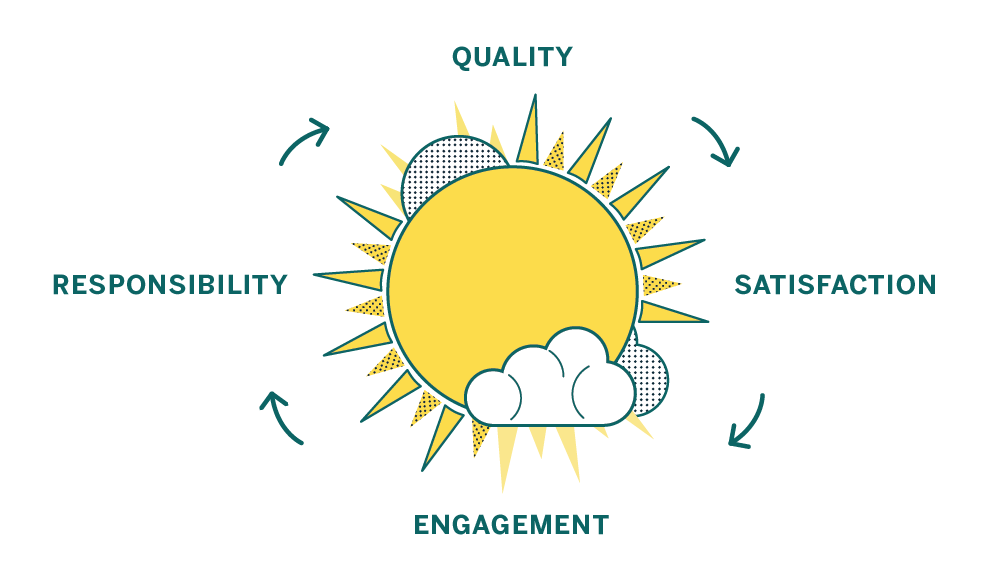
A focus on quality leaves individual contributors feeling satisfied, which makes them more engaged. That engagement leads to a sense of responsibility over the product and the code. A sense of responsibility and ownership leads to higher quality work, and the cycle starts over again.
Here at Code Climate we have experience as software engineers, engineering managers, product owners, and startup founders – and in all those roles we’ve seen evidence that a commitment to code quality has amazing benefits. Over time your codebase will become healthier, making it easier to change, more fun to work with, and your features will be easier to implement. As a result your code will be more reliable when it runs, bringing benefits to your business. Sounds good, right?
Unfortunately, breaking out of a vicious cycle is challenging because the cycle feeds on itself and doesn’t allow much time for the work needed to establish good practices. But while there is work involved, it’s definitely not impossible, and good tools and advice can help you beat the clock and replace your vicious cycle with a culture of code quality.
We’ve identified steps you can take to move toward a sustainable culture of code quality, no matter what kind of code you’re working with:
- Codify your best practices
- Automate, automate, automate
- Get the right info to the right people
- Measure your progress
- Encourage participation and ownership

Developers have access to a variety of tools to help ensure that the code they produce doesn’t break, works as intended, and is easy to understand. Among them are tools that use static analysis.
Static analysis is a technique used to discover issues in your code without actually running it.
Finding issues with your code before it runs is a good thing because it means that you can address issues before they hit production, before they bother users, or before they are costly in any way. Because so much research attention has been paid to static analysis over the years, it’s possible to find all kinds of interesting problems in code without executing it — it really seems like magic!
Let’s start with a small example of the kind of simple things that static analysis can uncover that can save you actual time during development, and prevent real bugs and maintainability issues. Check out this snippet of JavaScript code:
function main(a,b){ return a == null; }
An experienced JavaScript developer looking at this code can probably note a couple of things right off the bat:
- The ‘b’ variable is unused in the function
- The function name ‘main’ is not descriptive of its functionality
- You should use
===, not==when comparing tonull
While a less seasoned developer might miss #3 or disagree with #2, at least two of these, #1 and #3, can be automatically detected by static analysis. That’s right — instead of a developer having to context switch and review simple things, you can have it done automatically. And as the old saying goes (okay, it’s not an old saying, we just made it up):
When in doubt, automate.
So what kinds of issues can static analysis find? Let’s take a look:
- Quality issues themselves come in a variety of flavors. You can discuss quality in terms of code clarity, bug risk, and complexity, to name a few. Different issues require different means of detection, but many quality issues boil down to analysis that understands the conventions of the programming language under scrutiny. Tools developed within programming language communities tend to enforce the idioms of that community, which can be a very helpful thing in static analysis.
- Security is important to most users of static analysis, and a wide range of issues can be detected. Simple security checks can take the form of making sure that your dependencies are up-to-date or enforcing the deprecation of unsafe functions or APIs. Sophisticated security checks can do what is called data flow analysis, where the paths of data that come from “outside” of the system are extrapolated using complex algorithms.
- Style issues in code are often trivial to detect, but implementing and maintaining consistent style guidelines is a key component of an effective code review process and a maintainable codebase. Simply taking discussions about style off the table can work wonders for a team that tends to quarrel endlessly over the nitpicking style issues that, in the long run, can be automated away.
Between quality, security, and style, static analysis is a serious power-up for your development workflow. So how do you get in on this?
The most useful places to get static analysis results are on your developer’s machines, and again in your team’s pull requests. Fortunately, Code Climate does both.
With our command line tool, you can run a variety of static analysis tools at once to enforce your team’s standards and also look for subtle bugs, complexity issues, duplication, and more. As everyone on your team has access to these tools locally, they can make sure that they aren’t introducing new issues when they push code, improving the quality of commits.
After you push, analysis is run on the Code Climate server and the results pushed directly to your pull request. Reviewers can instantly see that your code doesn’t introduce new errors, letting them focus on reviewing the aspects of the commit which require human expertise.
Once you get some automated static analysis in your workflow, you’ll wonder how you lived without it. The tedious but necessary tasks that burn out your best developers are the ones at which computers excel – and will ensure your code is secure, not prone to a variety of annoying bugs, and conforms to your team’s best practices. We suggest checking it out today!

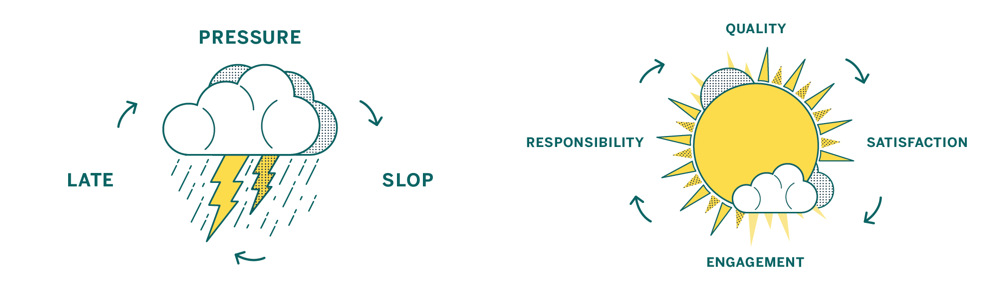
In our first post, we looked at how pressure-driven development leads to sloppy code and saw how shifting focus from deadlines to quality leads to happier, more productive teams. In this part, we’ll cover in detail five steps you can take to make that shift, so you have an actionable plan for building a culture of quality in your team.
1. Codify your best practices
Establish a shared and agreed-upon style and standard.
One of the best first steps you can take as a team is to start working on a style guide for the various languages and frameworks you use.
Style guides reduce friction because they take a whole class of issues off the table during code review. They enforce standards by codifying best practices. And best of all, style guides make contribution easier because people will know your project’s contribution requirements up front.
There are lots of great examples online, like GitHub’s Ruby Style Guide or Airbnb’s JavaScript Style Guide. They each represent the guidelines of contributing code to existing projects in those organizations, and guide how code is written when new projects are made.
2. Automate, automate, automate
Let your tools work for you.
When it comes to working on your internal process and company culture, it’s important that any improvements you introduce are perceived as being worth any additional work involved. Style guides are one great example of this, as enforcing a style guide is a much longer project than creating one.
To reduce the amount of work for your engineers, project managers, and QA team, seek to automate whatever tools they are using as part of your overall process. Relieve your team of the burden of running tests locally, and instead run them automatically on a centralized CI server. Instead of relying on everyone to run multiple code quality tools locally, run them simultaneously and automatically with Code Climate. Reducing the friction inherent in running these tools will make a big impact in your organization.
3. Get feedback in the right places
Bring the right data to the right people at the right time.
Once you’ve automated your build process and style guide enforcement, it’s time to make sure that the information gets to the right people. Don’t make people go to the data, bring the data to the people.
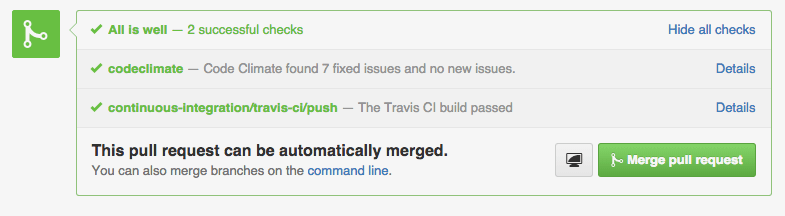
Tools that can post where your developers work – like in a GitHub Pull Request – have an advantage of those that don’t. Bringing feedback about code that doesn’t pass the style guide, or doesn’t pass tests inline with code review as it happens makes a huge impact.
When people see data, they can act on it. It’s as simple as that.
4. Measure your progress
Quantify what matters to you.
Building a culture of code quality means creating quantitative goals, and having quantitative goals depends on having stuff that you can measure. Tools like Code Climate can help you create guidelines for progress, and offer ways for your team to see the impact that they are having on the code over time.
Once you have metrics like the GPA of your Code Climate repo or the number of issues found by Code Climate’s static analysis engines, you can begin to act on them. To start with, though, there are just two guidelines you need to keep in mind to observe your code quality improving, your communication getting easier, and your results coming faster:
- Leave code better than you found it
- Don’t introduce new files that aren’t up to quality standards
When you focus on the impact of every proposed change to your code, you’ll improve with every commit.
5. Encourage participation and ownership
Once your tools are set up and running smoothly, it’s up to your team to enforce standards and welcome feedback evenly. You’ll find that getting these best practices in place involves making many compromises: older projects will have established standards while new projects may be opportunities to explore new ideas.
When every individual on every team is working along with a set of automated tools that provide actionable, quantified data, you’re on your way to a culture of code quality. Remember that your team wants to execute at the highest possible levels, and everyone participating in an open, encouraging atmosphere will activate the potential of the virtuous cycle.
Getting there takes time and energy, but we think the steps outlined here will send you well on your way. You’ll be able to measure your progress, react when necessary, and stay on top of your goals: to ship awesome stuff, and achieve a virtuous cycle that perpetuates healthy code and happy developers.

Today we’re excited to announce that the Code Climate Quality platform is out of beta. When we launched the first open, extensible platform for static analysis back in June of last year, we knew it would take some time to perfect. Since then, we’ve been working hard to add features, fix bugs, support community contributors, and upgrade infrastructure to create a superior experience for developers everywhere.
Our engines-based analysis now offers the key features you’ve come to expect from our “classic” offering, and a lot more, including:
- Style checks for Ruby, PHP and Python
- Support for more programming languages like Go, Haskell, JSX, CoffeeScript and SCSS; and frameworks like Ember.js, React and RubyMotion
- Dependency audits for potential vulnerabilities in your RubyGems and NPM packages
- Atom editor integration and a CLI to get feedback before you push
- Improved configurability and tuning options support in
.codeclimate.yml(and per-engine config files) - Ability to create your own analysis engines using our open source spec and make them available through CodeClimate.com
Already, Code Climate serves tens of thousands of developers. We’re proud to be working with a community of over 100 contributors and members of our Developer Program to provide over 1,800 checks across 20 static analysis engines on our new platform.
"Code Climate allows us to incrementally improve and maintain good code hygiene, decreasing the number of defects in our products, and leading to better overall product quality. The Code Climate open platform is a game changer and allows us to build and improve static analysis engines to support our highly complex environment." — Andy Blyler, Senior Director of Engineering, Barracuda Networks
For those who gave our engines-based analysis a try soon after launch, in addition to bug fixes you’ll notice a number of key improvements, including:
- Visibility into the analysis process via our new Builds pages
- More accurate ratings and GPAs
- Improved Issues browsing and filtering
- Better performance for faster results
- Improved stability from infrastructure upgrades we’ve made behind the scenes
Want to see it for yourself? Take a look!
Start using the Code Climate Quality platform today
Sign up today to get started with Code Climate Quality for your projects.
For existing customers, just follow these instructions for moving your repositories over to our new engines-based analysis. We’re confident that you’ll find it’s a superior experience to our “classic” offering.
Finally, we recognize that Code Climate is most valuable when you can use it wherever your work. For customers whose ability to host code with third-party services is limited, we recommend Code Climate Enterprise, our on-premise service.
With the new foundation that the Code Climate Quality platform provides, we’re looking forward to the new opportunities we’ll have to bring you even more functionality. Stay tuned for more big announcements (you can follow us on Twitter here).

Update: See our CEO and Co-Founder Bryan Helmkamp introducing the Code Climate Quality Platform!
Today, we’re thrilled to launch the Code Climate Quality Platform − the first open, extensible platform for all types of static analysis.
We’ve come a long way since we started building a static analysis tool for Rubyists. Today, we’re fortunate enough to help 50,000 developers analyze about 700BN lines of code every weekday. As we’ve grown, we’ve seen that clear, actionable static analysis leads to healthier code and happier developers. Our new platform brings those benefits to every team, regardless of the technologies they use, so that they can focus on shipping quality software.
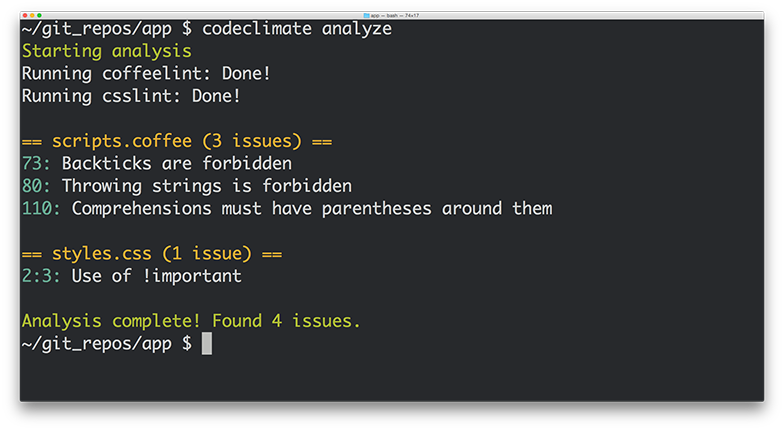
What does this mean exactly? First, we’re open sourcing our analysis tools, including the engines and algorithms we use to evaluate code. If you have a running Docker host, using Code Climate on your command line is as easy as:
boot2docker up && `boot2docker shellinit` brew tap codeclimate/formulae brew install codeclimate
We’re also enabling anyone to write static analysis engines that run on our servers by following a simple specification. No longer will you have to wait for us to provide support for your programming languages, frameworks and libraries of choice. Finally, using our new Code Climate CLI, you can now run any Code Climate-compatible static analysis on your laptop – for free.
Let’s look at each of these in turn…
Open Source
We’re releasing the static analysis engines that power the new Code Climate Quality Platform, and going forward, all of our static analysis code will be published under Open Source licenses. Code Climate has always provided free analysis to Open Source projects, and this continues to deepen our commitment to, and participation in, the OSS community.
Code Climate has always stood on the shoulders of giants in depending on Open Source libraries for the bulk of our static analysis algorithms. We would not exist today if not for the great work of people like Ryan Davis (Flog, Flay) and Justin Collins (Brakeman) that demonstrated the value of static analysis and allowed us to quickly bring it to developers.
Open Source static analysis means you can dig in and understand exactly how your code is being evaluated. And customizing static analysis algorithms becomes as simple as clicking the “Fork” button on GitHub…
Extensible
With the release of our new Code Climate Engine Specification, anyone can write static analysis engines that run on our servers. Code Climate’s set of officially supported languages can be augmented with community supported static analysis engines so that you can get confidence in your code, regardless of your choice of technology. For years, our most common type of feature request has been, “Can you add support for X?”, where X is a programming language, version of a language, or sometimes a framework. We’ve always wanted Code Climate to work for all developers, but in the past we were limited by the effort required to add new languages.
We believe that you shouldn’t have to wait for a vendor to add support for the languages you love, so are finally removing ourselves as the bottleneck to new static analysis features. Anyone who is interested in using Code Climate with their favorite languages, frameworks and libraries is free to build an engine to do so. Results from engines retain all the benefits of the Code Climate product, including automatic analysis of every Pull Request, comparison views, ratings/GPAs, and notifications. Of course, there’s already a vibrant community of OSS static analysis tools, and we’re excited to see what people are able to build and integrate. It’s really astounding how simple it is to build a Code Climate engine, as we’ve watched developers build functioning analysis from scratch in a matter of a couple hours.
If you want to give it a try, join our new Developer Program and we’ll be there to guide you along the way.
Run Anywhere
In addition to the spec, we’re also releasing the Code Climate CLI, which makes it easy to get static analysis results (both from Code Climate’s official engines and community-supported engines) in one clear, unified report right on your laptop. When you’re ready, you can load your repository into codeclimate.com and we’ll automatically apply the exact same configuration you use locally to analyze every commit and Pull Request, making the results available to your entire team.
To make static analysis truly ubiquitous, we realized it was not enough to support a wide variety of tools, we need to make it trivial to run these tools anywhere the developer is working. You shouldn’t have to wait to push your source code to a remote server to get clear, actionable static analysis results. Now it’s possible to easily run the same static analysis we run on our servers on your command line.
New Static Analysis Engines
We’re fortunate to be partnering with creators of two prominent Open Source projects who understand the value of static analysis in ensuring healthy code, Tom Dale from Ember.js and Laurent Sansonetti from RubyMotion. Here’s what they have to say about the Code Climate Quality Platform:
“The Ember community takes good tooling seriously. I’m excited to partner with Code Climate and bring their service to our users because better static analysis means better Ember apps.”
– Tom Dale from Ember.js
“HipByte is excited to partner with CodeClimate to provide clear and reliable code reviews for RubyMotion projects. RubyMotion allows Ruby developers to write cross-platform apps for iOS and Android by leveraging the native platform APIs, and a tool for static analysis means fewer crashes and more reliable applications.”
– Laurent Sansonetti from RubyMotion
Accordingly, we’re releasing an Ember.js engine that brings the Ember Watson tool to all Code Climate users, and a set of custom checks for RubyMotion that will help ensure that your application code is reliable.
In addition, we’re proud to release eight new static analysis engines that you can start using with Code Climate today:
- Gofmt, Govet and Golint – The official style, bug and lint checkers from the Go team
- CoffeeLint – Style checking for the CoffeeScript dialect of JavaScript
- CSSLint – Style checking for all CSS stylesheets
- Rubocop – Style and quality checks for Ruby code (including support for RRuby 2.2+)
- ESLint – Linting and style checking for your modern EcmaScript/JavaScript code
- Bundler Audit – Find security vulnerabilities in your Ruby dependencies
- PHP CodeSniffer – Style checking for PHP
Healthy Code Ships Faster
In many ways, our new platform is a culmination of the experience we’ve gained over the past four years building and operating the most popular static analysis app. We’re excited to bring this to you, and look forward to continuing to bring you the best tools to ship better code, faster. If you want to try out the new Code Climate, download our CLI to get started.

In exciting programming language news (how often do you get to say that?) Apple recently released Swift, a compiled language meant to augment Objective-C for development on Desktop and Mobile iOS platforms. While Swift’s primary audience at this (very early) point is iOS developers, the language contains some interesting functionality for program design that will appeal to a wider audience, including Ruby, JavaScript, and PHP developers.
In this post I’ll take a look at three of the program design constructs that Swift provides: Classes, Structures, and Protocols. I’ll discuss how they can contribute to well-designed Object-Oriented (OO) programs in a way that might be interesting to dynamic language programmers, and show how aspects of their design reflect concerns of the platform for which they were developed.

Classes and Structures
The best source of information about Swift so far is The Swift Programming Language, a free e-book provided by Apple. It contains a first pass introduction to the language, a language reference, and a good deal of example code. After introducing the basic facilities of the language – its philosophy, the basic available types and data structures, control flow, closures, and so on – we get to the section on Classes and Structures.
“Classes and structures are general-purpose, flexible constructs that become the building blocks of your program’s code.” [1]
This sounds similar to the functionality of a Class or Module in Ruby. From this list of the features of Classes and Structures, we see even more similarities. Classes and Structures can both:
- Define properties to store values
- Define methods to provide functionality
- Define initializers to set up their initial state
- Be extended to expand their functionality beyond a default implementation
This means that Swift provides similar functionality to familiar OO Programming Languages. We can model problems using objects which can encapsulate data and functionality, and build complex relationships between these objects in a modular fashion. Curious readers might have the same reaction to this as I did – if it’s the case that both classes and structures can do the above, which is a reasonable set of functionality to expect from classes, why are there two constructs? What are the differences between them, and why does Swift as a programming language need both?
First, let’s take a look at what Classes can do that Structures cannot. Classes provide functionality for two crucial pieces of OO functionality that Ruby developers, for instance, tend to rely on somewhat heavily:
- Inheritance, where one class can inherit the characteristics of another
- Type casting, where you can check and interpret the type of a class instance at runtime
Additionally, classes provide the following facilities which are stated in terms familiar to those with experience managing resources and memory manually:
- Deinitializers, to enable an instance of a class to free up any resources it has assigned
- Reference counting, to allow for more than one reference to a class instance
Stated in other terms, inheritance, type casting, deinitializers, and reference counting make it possible to expressively create designs which employ the full compliment of OO techniques.
From my perspective, Classes and Structures have just the right amount of overlap in functionality, leaving enough room for developers to make reasoned decisions about which construct to employ according to the purpose it may be used for. The differences hinge on how instances of Classes and Structures are represented in memory after they are initialized – structure instances are always passed by value and class instances are always passed by reference. This distinction is something that dynamic language developers typically do not have to spend much time thinking about – on a mobile platform, however, this kind of thinking becomes very important.
Different memory semantics is not the only advantage of having these distinct types, however. Because structures are simpler than classes, and cannot be as heavily modified after declaration, they provide an opportunity to create value objects which represent pieces of data independent from their behavior. This is very useful.
While Classes and Structures cover much of the familiar ground with respect to OO functionality in Ruby or Python, there is one more construct that might not be so familiar that I’d like to point out before we draw any conclusions on Swift’s OO design capabilities.
Protocols
Protocols are an interesting addition to the already rich world of classes and structures. They provide a way to define behavior separately from the classes which implement them:
“A protocol defines a blueprint of methods, properties, and other requirements that suit a particular task or piece of functionality”
Similar constructs exist in Java, Go, and other languages, but many dynamic languages do not embrace this design style. Protocols embrace flexible design by encapsulating the necessary data and behavior for a domain idea outside the scope of a Class or Structure definition. This means that a concept can be represented separately from its implementation, allowing for more creative reuse, composition, and more.
To illustrate the usefulness of Protocols, consider the development of a small networked process to record some information from a system over time. You might want to have the system write to a Key-Value store, or to disk, or to STDOUT, depending on a variety of circumstances. In this case, you would simply define a Protocol:
protocol BackEnd { func get(Int) -> Int func set(Int) -> Bool }
This protocol requires that anything which implements them must contain at least two instance methods – get, which accepts an Integer and returns an Integer, and set, which accepts an Integer and returns a Boolean value. A class that implements this Protocol might look something like the following:
class RedisBackEnd : BackEnd { func get(id: Int) -> Int { // Get 'val' from Redis based on 'id' let val = getFromRedis(id) return val } func set(val: Int) -> Bool { // Store 'val' in Redis here let boolFromRedis = storeInRedis(val) return boolFromRedis } }
You could imagine similar classes for the other backends I mentioned above. This is a very convenient solution for swapping out backends when you need to run your process in different locations and under different circumstances – simply implement new ones as needed, and pass them in wherever a Backend is needed.
Defining a Protocol and implementing it is really the tip of the iceberg, however – things can get very subtle and complex. Protocols can be treated as types, and intricate hierarchies can be created with them. While it is interesting to look through the Swift book to see these examples, I don’t believe they are the real selling points of protocols. Used simply and in combination with classes and structures, protocols provide a missing piece of the design puzzle that often vexes programmers in dynamic languages.
Conclusion
Swift is a very interesting programming language that at first blush appears to have all of the necessary components to build expressive OO programs. In addition to classes, structures, and protocols, Ruby developers might also want to look into Extensions which offer mixin-like capabilities.
Whether you prefer inheritance, composition, or even a more esoteric SmallTalk style flavor of OO, it seems that Swift will be able to support you.
Works Cited
[1] Apple Inc. “The Swift Programming Language.” iBooks.