Resources & Insights
Featured Article
Navigating the world of software engineering or developer productivity insights can feel like trying to solve a complex puzzle, especially for large-scale organizations. It's one of those areas where having a cohesive strategy can make all the difference between success and frustration. Over the years, as I’ve worked with enterprise-level organizations, I’ve seen countless instances where a lack of strategy caused initiatives to fail or fizzle out.
In my latest webinar, I breakdown the key components engineering leaders need to consider when building an insights strategy.
Why a Strategy Matters
At the heart of every successful software engineering team is a drive for three things:
- A culture of continuous improvement
- The ability to move from idea to impact quickly, frequently, and with confidence
- A software organization delivering meaningful value
These goals sound simple enough, but in reality, achieving them requires more than just wishing for better performance. It takes data, action, and, most importantly, a cultural shift. And here's the catch: those three things don't come together by accident.
In my experience, whenever a large-scale change fails, there's one common denominator: a lack of a cohesive strategy. Every time I’ve witnessed a failed attempt at implementing new technology or making a big shift, the missing piece was always that strategic foundation. Without a clear, aligned strategy, you're not just wasting resources—you’re creating frustration across the entire organization.
Sign up for a free, expert-led insights strategy workshop for your enterprise org.
Step 1: Define Your Purpose
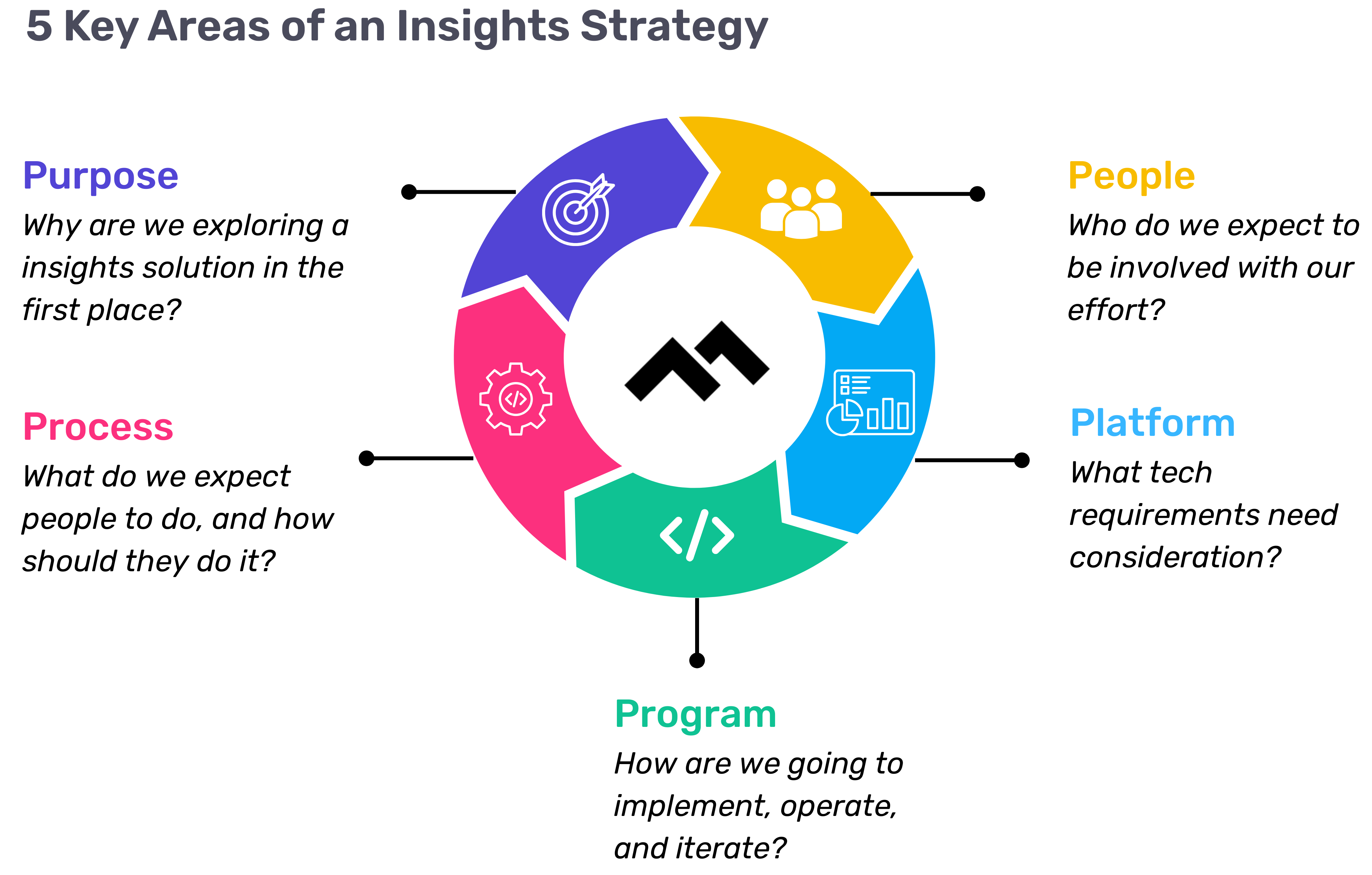
The first step in any successful engineering insights strategy is defining why you're doing this in the first place. If you're rolling out developer productivity metrics or an insights platform, you need to make sure there’s alignment on the purpose across the board.
Too often, organizations dive into this journey without answering the crucial question: Why do we need this data? If you ask five different leaders in your organization, are you going to get five answers, or will they all point to the same objective? If you can’t answer this clearly, you risk chasing a vague, unhelpful path.
One way I recommend approaching this is through the "Five Whys" technique. Ask why you're doing this, and then keep asking "why" until you get to the core of the problem. For example, if your initial answer is, “We need engineering metrics,” ask why. The next answer might be, “Because we're missing deliverables.” Keep going until you identify the true purpose behind the initiative. Understanding that purpose helps avoid unnecessary distractions and lets you focus on solving the real issue.
Step 2: Understand Your People
Once the purpose is clear, the next step is to think about who will be involved in this journey. You have to consider the following:
- Who will be using the developer productivity tool/insights platform?
- Are these hands-on developers or executives looking for high-level insights?
- Who else in the organization might need access to the data, like finance or operations teams?
It’s also crucial to account for organizational changes. Reorgs are common in the enterprise world, and as your organization evolves, so too must your insights platform. If the people responsible for the platform’s maintenance change, who will ensure the data remains relevant to the new structure? Too often, teams stop using insights platforms because the data no longer reflects the current state of the organization. You need to have the right people in place to ensure continuous alignment and relevance.
Step 3: Define Your Process
The next key component is process—a step that many organizations overlook. It's easy to say, "We have the data now," but then what happens? What do you expect people to do with the data once it’s available? And how do you track if those actions are leading to improvement?
A common mistake I see is organizations focusing on metrics without a clear action plan. Instead of just looking at a metric like PR cycle times, the goal should be to first identify the problem you're trying to solve. If the problem is poor code quality, then improving the review cycle times might help, but only because it’s part of a larger process of improving quality, not just for the sake of improving the metric.
It’s also essential to approach this with an experimentation mindset. For example, start by identifying an area for improvement, make a hypothesis about how to improve it, then test it and use engineering insights data to see if your hypothesis is correct. Starting with a metric and trying to manipulate it is a quick way to lose sight of your larger purpose.
Step 4: Program and Rollout Strategy
The next piece of the puzzle is your program and rollout strategy. It’s easy to roll out an engineering insights platform and expect people to just log in and start using it, but that’s not enough. You need to think about how you'll introduce this new tool to the various stakeholders across different teams and business units.
The key here is to design a value loop within a smaller team or department first. Get a team to go through the full cycle of seeing the insights, taking action, and then quantifying the impact of that action. Once you've done this on a smaller scale, you can share success stories and roll it out more broadly across the organization. It’s not about whether people are logging into the platform—it’s about whether they’re driving meaningful change based on the insights.
Step 5: Choose Your Platform Wisely
And finally, we come to the platform itself. It’s the shiny object that many organizations focus on first, but as I’ve said before, it’s the last piece of the puzzle, not the first. Engineering insights platforms like Code Climate are powerful tools, but they can’t solve the problem of a poorly defined strategy.
I’ve seen organizations spend months evaluating these platforms, only to realize they didn't even know what they needed. One company in the telecom industry realized that no available platform suited their needs, so they chose to build their own. The key takeaway here is that your platform should align with your strategy—not the other way around. You should understand your purpose, people, and process before you even begin evaluating platforms.
Looking Ahead
To build a successful engineering insights strategy, you need to go beyond just installing a tool. An insights platform can only work if it’s supported by a clear purpose, the right people, a well-defined process, and a program that rolls it out effectively. The combination of these elements will ensure that your insights platform isn’t just a dashboard—it becomes a powerful driver of change and improvement in your organization.
Remember, a successful software engineering insights strategy isn’t just about the tool. It’s about building a culture of data-driven decision-making, fostering continuous improvement, and aligning all your teams toward achieving business outcomes. When you get that right, the value of engineering insights becomes clear.
Want to build a tailored engineering insights strategy for your enterprise organization? Get expert recommendations at our free insights strategy workshop. Register here.Register here.
Andrew Gassen has guided Fortune 500 companies and large government agencies through complex digital transformations. He specializes in embedding data-driven, experiment-led approaches within enterprise environments, helping organizations build a culture of continuous improvement and thrive in a rapidly evolving world.
Navigating the world of software engineering or developer productivity insights can feel like trying to solve a complex puzzle, especially for large-scale organizations. It's one of those areas where having a cohesive strategy can make all the difference between success and frustration. Over the years, as I’ve worked with enterprise-level organizations, I’ve seen countless instances where a lack of strategy caused initiatives to fail or fizzle out.
In my latest webinar, I breakdown the key components engineering leaders need to consider when building an insights strategy.
Why a Strategy Matters
At the heart of every successful software engineering team is a drive for three things:
- A culture of continuous improvement
- The ability to move from idea to impact quickly, frequently, and with confidence
- A software organization delivering meaningful value
These goals sound simple enough, but in reality, achieving them requires more than just wishing for better performance. It takes data, action, and, most importantly, a cultural shift. And here's the catch: those three things don't come together by accident.
In my experience, whenever a large-scale change fails, there's one common denominator: a lack of a cohesive strategy. Every time I’ve witnessed a failed attempt at implementing new technology or making a big shift, the missing piece was always that strategic foundation. Without a clear, aligned strategy, you're not just wasting resources—you’re creating frustration across the entire organization.
Sign up for a free, expert-led insights strategy workshop for your enterprise org.
Step 1: Define Your Purpose
The first step in any successful engineering insights strategy is defining why you're doing this in the first place. If you're rolling out developer productivity metrics or an insights platform, you need to make sure there’s alignment on the purpose across the board.
Too often, organizations dive into this journey without answering the crucial question: Why do we need this data? If you ask five different leaders in your organization, are you going to get five answers, or will they all point to the same objective? If you can’t answer this clearly, you risk chasing a vague, unhelpful path.
One way I recommend approaching this is through the "Five Whys" technique. Ask why you're doing this, and then keep asking "why" until you get to the core of the problem. For example, if your initial answer is, “We need engineering metrics,” ask why. The next answer might be, “Because we're missing deliverables.” Keep going until you identify the true purpose behind the initiative. Understanding that purpose helps avoid unnecessary distractions and lets you focus on solving the real issue.
Step 2: Understand Your People
Once the purpose is clear, the next step is to think about who will be involved in this journey. You have to consider the following:
- Who will be using the developer productivity tool/insights platform?
- Are these hands-on developers or executives looking for high-level insights?
- Who else in the organization might need access to the data, like finance or operations teams?
It’s also crucial to account for organizational changes. Reorgs are common in the enterprise world, and as your organization evolves, so too must your insights platform. If the people responsible for the platform’s maintenance change, who will ensure the data remains relevant to the new structure? Too often, teams stop using insights platforms because the data no longer reflects the current state of the organization. You need to have the right people in place to ensure continuous alignment and relevance.
Step 3: Define Your Process
The next key component is process—a step that many organizations overlook. It's easy to say, "We have the data now," but then what happens? What do you expect people to do with the data once it’s available? And how do you track if those actions are leading to improvement?
A common mistake I see is organizations focusing on metrics without a clear action plan. Instead of just looking at a metric like PR cycle times, the goal should be to first identify the problem you're trying to solve. If the problem is poor code quality, then improving the review cycle times might help, but only because it’s part of a larger process of improving quality, not just for the sake of improving the metric.
It’s also essential to approach this with an experimentation mindset. For example, start by identifying an area for improvement, make a hypothesis about how to improve it, then test it and use engineering insights data to see if your hypothesis is correct. Starting with a metric and trying to manipulate it is a quick way to lose sight of your larger purpose.
Step 4: Program and Rollout Strategy
The next piece of the puzzle is your program and rollout strategy. It’s easy to roll out an engineering insights platform and expect people to just log in and start using it, but that’s not enough. You need to think about how you'll introduce this new tool to the various stakeholders across different teams and business units.
The key here is to design a value loop within a smaller team or department first. Get a team to go through the full cycle of seeing the insights, taking action, and then quantifying the impact of that action. Once you've done this on a smaller scale, you can share success stories and roll it out more broadly across the organization. It’s not about whether people are logging into the platform—it’s about whether they’re driving meaningful change based on the insights.
Step 5: Choose Your Platform Wisely
And finally, we come to the platform itself. It’s the shiny object that many organizations focus on first, but as I’ve said before, it’s the last piece of the puzzle, not the first. Engineering insights platforms like Code Climate are powerful tools, but they can’t solve the problem of a poorly defined strategy.
I’ve seen organizations spend months evaluating these platforms, only to realize they didn't even know what they needed. One company in the telecom industry realized that no available platform suited their needs, so they chose to build their own. The key takeaway here is that your platform should align with your strategy—not the other way around. You should understand your purpose, people, and process before you even begin evaluating platforms.
Looking Ahead
To build a successful engineering insights strategy, you need to go beyond just installing a tool. An insights platform can only work if it’s supported by a clear purpose, the right people, a well-defined process, and a program that rolls it out effectively. The combination of these elements will ensure that your insights platform isn’t just a dashboard—it becomes a powerful driver of change and improvement in your organization.
Remember, a successful software engineering insights strategy isn’t just about the tool. It’s about building a culture of data-driven decision-making, fostering continuous improvement, and aligning all your teams toward achieving business outcomes. When you get that right, the value of engineering insights becomes clear.
Want to build a tailored engineering insights strategy for your enterprise organization? Get expert recommendations at our free insights strategy workshop. Register here.Register here.
Andrew Gassen has guided Fortune 500 companies and large government agencies through complex digital transformations. He specializes in embedding data-driven, experiment-led approaches within enterprise environments, helping organizations build a culture of continuous improvement and thrive in a rapidly evolving world.
All Articles

This is the second post in a two-part series. Read the first post here.
When you use an Engineering Intelligence Solution to answer the classic three standup questions, you free up your team’s valuable meeting time for an even more impactful set of conversations. You’ll be able to spend less time gathering information and more time leveraging your expertise as a leader — once you’re no longer using facetime to surface issues, you can actually start solving them.
To frame these conversations, I recommend a new set of questions to ask in standup meetings:
- How can I help remove distractions?
- How can the team help reduce risk?
- Are we working on the right things?
Here’s how to get the most out of each one.
Question 1 to ask in standup meetings: How can I help remove distractions?
To most effectively answer this question, you’ll need to come to standup prepared. Take a look through your Engineering Intelligence Solution and keep an eye out for patterns that might indicate your team’s attention is fragmented, such as engineers who are making commits on multiple different Issues, or team members who have stopped committing for a few days. Code Climate's Software Engineering Intelligence (SEI) solution offers visualizations of individual developers’ coding activity, which makes these patterns particularly easy to spot.
If you notice an engineer bouncing around, committing to multiple pieces of work in a short time period, it’s possible that engineer is trying to do too much at once. Have a conversion with that developer, and find out exactly what’s causing them to work in this way. It’s possible that they’re trying to make progress on multiple fronts at the same time, or that they’re being pulled in different directions by external forces, bouncing from project to project whenever a stakeholder asks a question or requests a status update. As their manager, you’re in a position to help the engineer develop the tools they need to devote the necessary level of focus to each unit of work. Exactly how you help depends on the situation — a more junior engineer may benefit from some coaching in project management skills, while a more senior engineer may need assistance contextualizing and prioritizing their work.
Of course, every engineer is juggling multiple things at once, and it’s not uncommon for someone to jump to a new project while they’re waiting for a Pull Request (PR) to be reviewed. Still, there’s a point at which task switching becomes excessive, and the visualizations in an SEI platform make that really clear, revealing potentially problematic switching in a haphazard assortment of commits, or delays getting back to paused units of work.
Sometimes, the delay itself is noteworthy. If an engineer is committing to something every day, then stops for a significant period of time before picking it back up again, it’s likely they’ve been pulled away to work on something else. Given how much time engineering teams spend grooming and prioritizing their backlog, this sort of deviation from the plan can be problematic, and yet, well-meaning developers often say yes to side tasks and additional projects without thinking about the cost. As a leader, if you notice this occurring, you can help your team members determine whether unplanned work is worthy of urgent attention, and remind them to assess any new tasks with you before taking them on.
Question 2 to ask in standup meetings: How can the team help reduce risk?
This question gets to one of the key goals of standup meetings: spotting and resolving problems before they derail sprints. Work that is at-risk is work that has started to go off track but hasn’t gone completely off the rails yet, which means you have the opportunity to stay a step ahead of a real problem. An SEI platform will alert you whenever a unit of work meets your criteria for “at-risk,” whether it’s a PR that has stalled without review or one that has too many contributing engineers, giving you the opportunity to quickly get the work back on track.
While some at-risk work can be indicative of larger issues — outdated processes or recurring bottlenecks in your development pipeline — at-risk work is often the result of a miscommunication regarding who should be doing what. For example, it’s common to see work get stuck in work in Code Review because everyone thought it was being reviewed by someone else on the team. When you bring risky units of work to standup for discussion, your team can quickly implement any straightforward fixes, then set aside time to work through bigger issues.
Question 3 to ask in standup meetings: Are we working on the right things?
With an SEI solution, you can easily see what units of work are progressing, so you can ensure your team members are working on the right things. Let’s say you prioritized tickets coming into your sprint, but notice that a developer is committing against the lowest priority Issue — you can discuss this as a team and rebuild alignment in the moment, rather than pretending you’ll always get it right at the top of the sprint. Almost certainly there was a miscommunication, and the developer jumped on what they thought was an important unit of work, though it’s also possible that an engineer thought the low-priority item was easiest to tackle and wanted to get it out of the way. This is rarely a good reason not to work on the highest priority things, and you can help coach the developer back to more important units of work. In some cases, the low-priority item may be the only thing the developer understood, so they jumped into it despite its low importance. This is important to know and address because if one person on the team doesn’t understand something, chances are other members of the team are also confused.
Whatever caused the low-priority item to be started, the team now has the opportunity to decide what to do about the unit of work in question. It may be that the work is so far along it makes sense to finish it, or it may be something the team decides to pause until higher-priority work is completed. Without a SEI solution, there would be no choice to make, as you’d only find out that someone was working on the ‘wrong’ thing after the work was already complete.
Data is a Powerful Tool for Skilled Managers
Though some leaders hesitate to leverage data, fearing that it breeds micromanagement, it’s important to remember that you’re already gathering information about stalled work or stuck engineers. Standups are one of the many ways managers seek out that information, but they’re not the most efficient way, since meeting time is better used for solving problems than surfacing them.
True micromanagement is not found in the gathering of data, but in how that data is used; micromanagers wield punishments and prescribe solutions, while great managers ask questions, offer guidance, and help their teams collaborate on solutions. With a Software Engineering Intelligence (SEI) solution pointing you towards work that needs attention, you’ll spend less time looking for opportunities to help and more time actually managing your team.

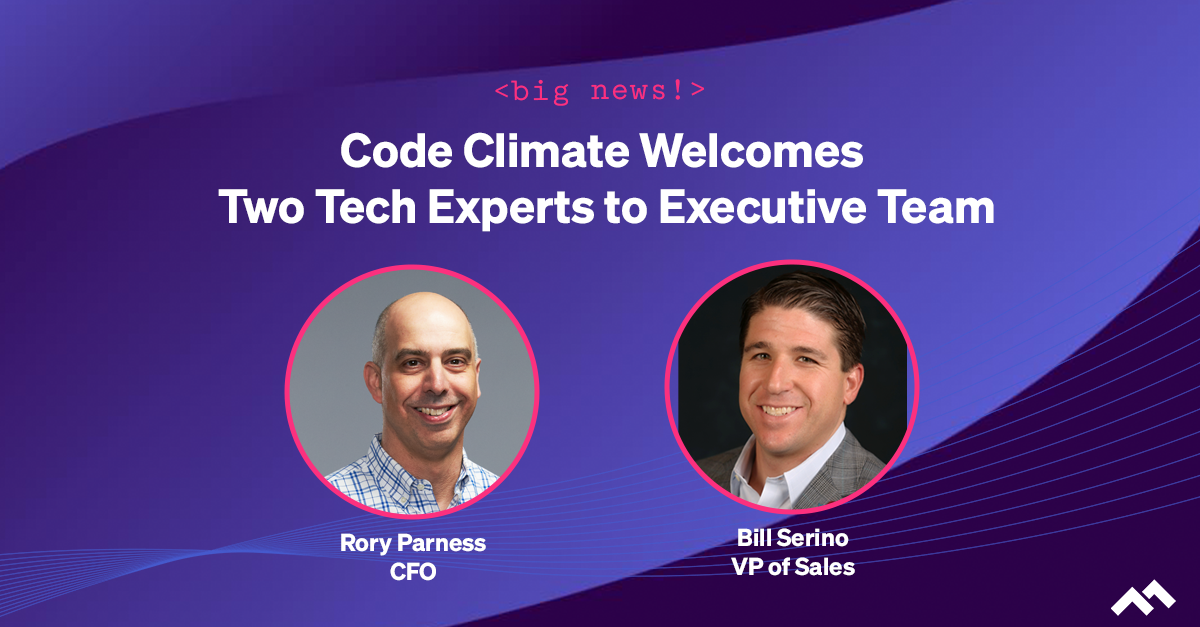
We are excited to share news today that we have two new tech industry experts joining our executive leadership team. This continues the incredible momentum we’ve experienced this year after closing our Series C round of funding in August, more than doubling our revenue, and significantly growing our team across the board.
Check out the full details in the Press Release:
Following Series C funding, this expansion of a highly accomplished group of leaders underpins a period of transformative growth.
Code Climate, the leader in Engineering Intelligence, today announced two key strategic hires, naming Rory Parness as CFO and Bill Serino as VP of Sales. These tech industry veterans join Code Climate as the company gains momentum on the heels of a successful Series C round of funding closed in August.
Parness and Serino are the latest additions to a seasoned executive leadership team brought on in 2021. Code Climate has experienced significant expansion over the past year, with revenue up more than 100 percent and headcount nearly doubling.
Parness joins Code Climate from Foursquare, where he served as CFO, leading the finance and operations teams for nearly a decade. Prior to Foursquare, he was the CFO of several companies in the technology, healthcare, and music industries. Over his 30-year career, Parness has helped scale companies to over $500 million in revenue and orchestrate a multi-billion dollar exit. He has also served as an advisor for several tech startups.
Serino brings a wealth of leadership experience to the Code Climate team, most recently from Harbr Data, an enterprise data exchange platform, where he was Global Head of Sales. Serino has extensive experience driving sales growth in multiple verticals in the Fortune 500, having held strategic sales roles at EMC and Oracle, and helping lead a successful IPO for Pivotal Software.
“As we continue to scale rapidly for a phenomenal period of growth, I’m super excited to welcome Rory and Bill as the latest members of our leadership team,” says Bryan Helmkamp, Code Climate co-founder and CEO. “The enterprise-grade level of experience that they each bring to Code Climate will help propel us to the next level and strengthen our position as the leading Engineering Intelligence company.”
This hypergrowth comes at a time when business and technology leaders must align on a more data-driven approach to decision making. Code Climate is deeply committed to investing in passionate people and innovative solutions to further its mission to build trust with transparency and fuel the next generation of software engineering excellence.

It’s no secret that performance reviews are flawed. Not only is occasional feedback unlikely to affect meaningful growth, but the feedback itself can also be suspect — studies indicate that numerical ratings reveal more about the rater than the person being reviewed, while open-ended evaluations are subject to a host of performance review biases.
Despite this research, most companies still rely on some form of performance review. They’re not ready to pivot from the idea of using reviews to promote professional development, and many employees aren’t either. As an engineering leader, you may not be able to overhaul your company’s review process, but you can still take steps to minimize some of its flaws. Engineering data found in your VCS and project management tools can help by acting as a check against anecdotal evidence and gut feel, helping you combat some common performance review biases.
Common Performance Review Biases
Biases may be evident in nearly every aspect of your day-to-day, but the open-ended format of most performance review frameworks is particularly vulnerable to some common biases. If you’re aware of their existence, you can take steps to counteract them.
Recency Bias
When reviews happen infrequently, the period of time right around review season is freshest in the reviewer’s mind and tends to be given the most weight.
What you can do: A skim of the Issues a developer worked on over the past year can be an important reminder of all they contributed, and a great way to refresh your memory. In addition, a deep dive into specific engineering metrics can help you distinguish longstanding patterns from recent anomalies. For example, you may have noticed that a developer is prioritizing their own work and putting off reviewing teammates’ Pull Requests. By looking at trends in a metric like Review Speed, you can determine whether or not that’s a new development, so you can calibrate your conversation accordingly.
Halo/Horns Effect
The Halo/Horns Effect occurs when a manager lets one trait — good or bad — skew their entire impression of an individual.
What you can do: There may be an engineer on your team who rarely speaks during meetings, and only participates when directly spoken to. You could take that as evidence that they’re generally disengaged at work, but data might reveal otherwise. If that same engineer has a consistently high PR Throughput and frequently participates in Code Review, it’s more likely that they just don’t like speaking up in group settings. With this information, you can offer specific feedback about their participation in meetings, rather than general (and inaccurate) feedback about their overall level of engagement, or you can adapt your expectations to match their work style.
Gender Bias
Studies show that reviewers tend to focus more on the personality traits of women and female-presenting individuals than on their skills or accomplishments.
What you can do: Make a conscious effort to focus on an individual’s work, and be sure to check any of your assumptions against objective data. For example, you can look at a developer’s history of commits, pushes, and review activity to confirm whether their work is in line with your expectations for a developer in their role. You might expect a more senior developer to spend less time committing new code and more time giving feedback to their teammates, but your expectations may be the opposite for a more junior team member.
Similarity Bias
This is the tendency of a manager to look more favorably on team members who remind them of themselves, perhaps due to a particular personality trait, a shared work style, or an aspect of their training or background.
What you can do: You may feel a particular kinship with a developer and assume that they’re achieving at the level you would in their role, but a look at the data — whether it’s their PR Throughput or a review of their contributions to Code Reviews — can help you regain perspective and ground your assessment in the reality of their work.
Using Data to Check Your Performance Review Biases
Data is not only a valuable tool for dismantling performance review biases, it can help you deliver specific, actionable feedback and collaborate with developers to set clear goals for the future. As with any tool, however, it must be used carefully.
Quantitative data should always be contextualized with qualitative data, and it’s important to resist the urge to compare or rank the members of your team. Developers coding new features will naturally work at a different pace than those working through technical debt, and team leads will likely be focused more on coaching or project management than committing code. You’ll need to pair data with an understanding of the circumstances surrounding each team member’s work in order to have a complete picture of their overall performance.
If you’re interested in learning more about incorporating data into your performance reviews, request a consultation.
Effective engineering leaders today deftly balance the needs of their organization with the needs of their developers. Tasked with making strategic decisions, coaching their teams, and driving process improvements to meet business objectives and key results, leaders are often distanced from the actual work of writing code. As such, leaders must empower their team members to excel, and engineering intelligence data can help in a number of ways.
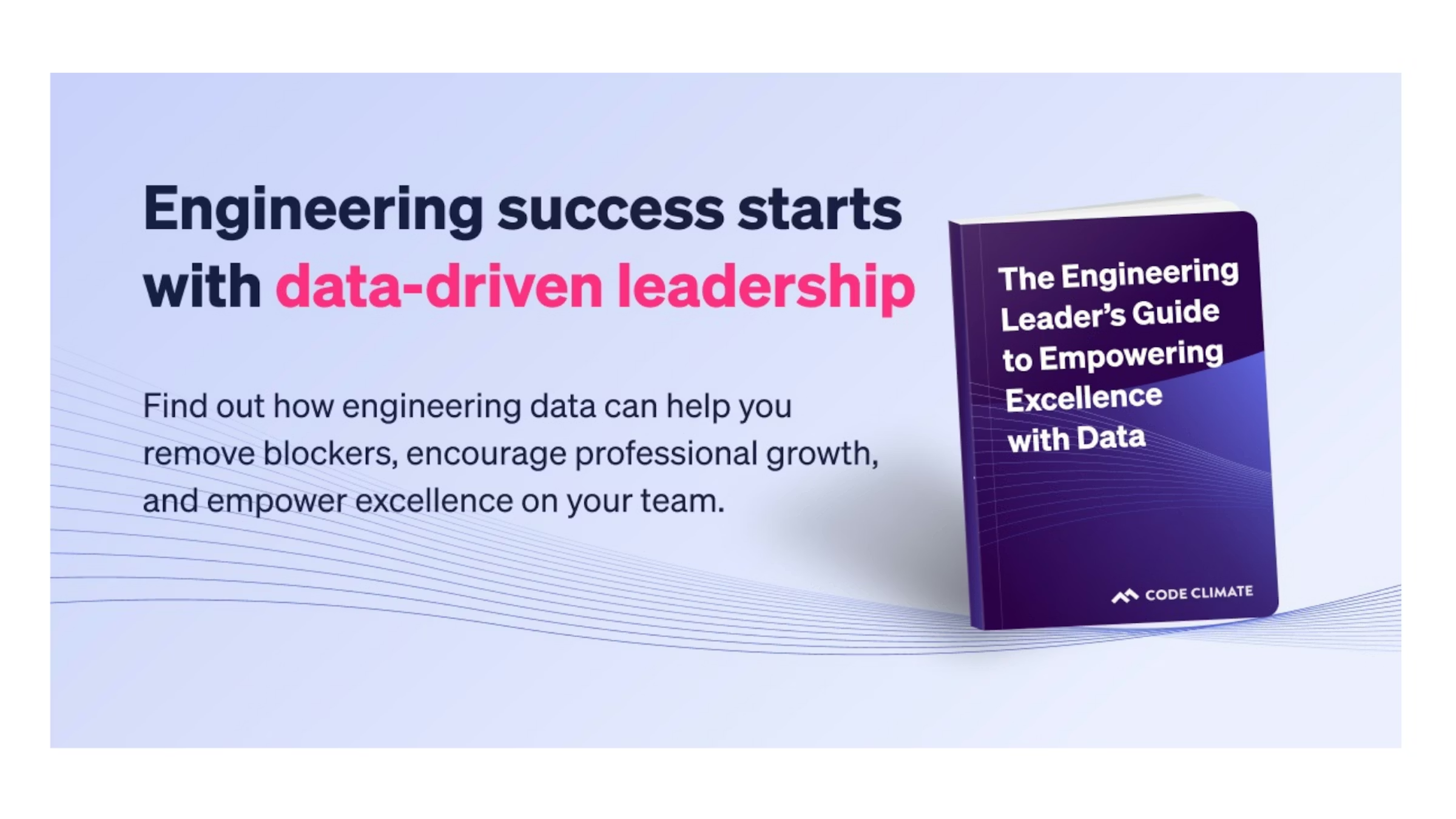
Find out how data can help you cultivate an engineering environment that drives success in our new ebook, The Engineering Leader’s Guide to Empowering Excellence with Data.
Focusing on four key areas—removing blockers, minimizing micromanagement, personalizing coaching, and fostering a culture of psychological safety—our ebook will help you gain actionable insights from data, rather than gut feelings, to achieve a developer-focused work environment.
With the right data, you can determine when to step in to lend support, and when to step back and encourage autonomy, so you can empower your team members to go above and beyond. Used thoughtfully, data can help you build stronger, more successful teams and drive continuous improvement.
An empowered team is a successful team. Download our ebook (for free!) today.

The final principle in the Agile manifesto urges developers to reflect on the past and use that knowledge to improve future outcomes. Since we learn from the past, holding sprint retrospectives is key to improving the results of future iterations. Conducted well, sprint retrospectives can boost outputs and propel teams forward; conducted poorly, they may breed toxicity. The careful use of objective data can help you steer your retro in the right direction — read on to find out how to leverage data from the beginning to the end of the retrospective process, so you can maximize the value of this key opportunity for continuous improvement.
Preparing for Your Sprint Retrospective
Practices vary by organization, but sprint retrospectives may be facilitated by anyone familiar with the sprint, from a developer on the team to a stakeholder from another department. If you find yourself in the facilitator role, it’s crucial that you build a strong foundation for your retro by performing an audit to collect data in advance.
Look back on the lifetime of the sprint, and ask yourself questions like:
- What was finished?
- Did we deliver all the items we intended to? If not, why?
- What specific units of work didn’t get shipped?
- What bottlenecks or blockers arose, and are they part of a pattern?
The answers will help you identify patterns and problem areas and formulate meaningful conversation points to guide the retrospective.
For example, if your sprint finished with a lot of unshipped work, you’ll want to know that in advance, so you can dig into the reasons during the retrospective. Look for unassigned tickets, which may indicate that some units of work were not prioritized correctly or that tickets were lost or overlooked unintentionally — though you’ll need to bring these tickets up at the retro to know for sure.
You’ll also want to look at the Issues from the iteration that are still categorized as In Progress, and see how many days they’ve been open. You can dig deeper by looking at the Pull Requests (PRs) associated with that Issue, and taking a look at relevant activity and comments for each. This can help you formulate a hypothesis as to why a unit of work was unshipped. For example, Issues with many PRs may indicate that work was not batched efficiently, while PRs with high levels of Rework may signal that an engineer was struggling with a difficult area of the codebase, or unclear technical direction. You can further investigate that hypothesis during your retro by discussing particular units of work to gain additional context and information.
While you can piece together this information from your VCS and project management tools, gaining a holistic view can be tedious as this data is typically dispersed. A Software Engineering Intelligence solution, like Code Climate, can save time and add a layer of valuable insights by aggregating that data in a series of customizable dashboards and rich visualizations.
Prioritize Your Sprint Retrospective
Typically, retrospectives last approximately 30 minutes for each week of the sprint, so if your sprint was three weeks long, you may want to carve out an hour and a half for your retro. Keep this time frame in mind to help you prioritize speaking points and focus on conversation topics that will keep your team engaged and on task.
Once you have compiled a list of topics, see if you discover any common themes and group them together. It may be helpful to get the perspective of your team members when you reach this point. Here at Code Climate, our facilitators ask the team to vote on which items should be talked through first to ensure engagement and alignment.
Open the Floor to Collaboration
In order to have a productive retrospective — one that surfaces meaningful opportunities for improvement — the team must feel safe talking through any missteps. The purpose of a retrospective is to measure processes, not individuals, so it’s important to remind your team to focus on the work, and not on the people behind it. As you set the stage for your retro, keep in mind that the data you gathered during preparation is to be used purely as an empowerment tool. When used appropriately, data can keep the conversation grounded in facts and tackle negative biases, allowing you and your team to have genuine conversations about things that could have been done better without making developers feel singled out.
Discuss
Now to discuss. Based on the topics you prioritized, you can split your sprint retrospective discussion portion into easily digestible parts. Though format can vary based on team and personal preference, many teams focus on three categories using a “Start, Stop, Continue” exercise, which asks developers to provide feedback on the following:
- Start: Actions we should start taking
- Stop: Actions we should stop or do away with
- Continue: Actions we should continue and codify
It can be helpful to use a visual aid to facilitate this exercise and keep the conversation on track. For in-person teams, that might mean distributing sticky notes that can be written on and affixed to a board; for remote teams, that might mean using a collaborative online platform like Trello. Take time to talk through each part, and…
Develop an Action Plan
By the end of the sprint retrospective, you and your team should have several actionable ideas to put into practice to help the next iteration go smoother. While this data is qualitative in nature, these new ideas can then be measured against the quantitative data (such as PR size) they are meant to improve during the next sprint, enabling you to enhance software development strategies as time goes on.
Standardize Sprint Retrospectives and Keep Improving
Best practices are best utilized when reinforced. Each new retro you hold keeps you on the path of continuous improvement.
While there is no golden rule as to how retros should be structured and held, some form of review is vital to achieving continuous improvement. By incorporating data into your retros, you can maximize the value of your discussions and help build a highly capable team that can successfully drive business goals.

Every day, engineering leaders ask their team members the same three standup questions to ensure the software development engine hasn’t come to a complete stop. It’s excruciatingly boring to be asked the same questions day in and day out, and it’s not a productive use of engineers’ time. These questions — the “are things moving?” questions — can be answered with the help of a Software Engineering Intelligence (SEI) solution, like Code Climate, freeing up valuable standup time for an even more impactful set of questions, the “how can we move faster?” questions. These are the questions that dig deeper into a team’s processes and practices, helping leaders identify opportunities for improvement and drive excellence on their teams.
In this two-post series, I’ll explain how data can help you answer the classic standup questions, then walk through the “next three questions,” that every engineering leader should be asking to level up their standups — and level up their team.
First, the classic questions:
- What did you do yesterday?
- What will you do today?
- What (if anything) is blocking your progress?
Let’s dig in.
Standup questions one and two: What did you do yesterday? What will you do today?
These questions are meant to help you understand what progress your team has made so far, so you can assess your team’s output within the context of your current sprint or cycle. In comparing what’s been done so far to what’s planned, you can get a sense of the sprint’s status.
Rather than ask your developers for a rundown of yesterday’s completed tasks and today’s to-do list, let the data speak for itself. You could do this by running a Git diff for every branch, or you could let Code Climate's SEI platform do the work, drawing connections between Commits and Issues and providing an accurate view of what your team is working on. This can also help you check that the team is prioritizing appropriately, and working on the most impactful Issues. You can also review the Issues that have yet to be started to determine whether the team is saving the trickier work for last. This isn’t necessarily a problem, but it could indicate that a slowdown is to come, and may be worth discussing during standup.
Of course, data won’t tell you for sure whether your team will hit its deadline, but it will give you a big picture view of how your sprint is progressing and where the team might need your help.
Standup question three: What (if anything) is blocking your progress?
Once you have a high-level understanding of the progress of your current iteration, you’ll want to know if there’s anything that might throw it off track. Developers might be hesitant to call out blockers, preferring instead to solve problems themselves, or they may lack the context to foresee potential slowdowns. Data addresses both of those problems, though the relevant information has historically been harder to find, as it’s spread throughout your VCS and project management tools. This is where a Software Engineering Intelligence (SEI) solution is particularly valuable — Code Climate can even send you a customized alert when a particular unit of work is stuck or at risk.
Work that is stuck may have gone a few days without a Commit, or may be marked “In Progress” in Jira for an atypical length of time. Work that is at risk is work that is not moving through the software development pipeline as expected, and which may become a bottleneck if not addressed. Though the signs of risk vary from team to team, Pull Requests with high levels of Rework, or many comments or Review Cycles are worth further investigation, as are PRs that haven’t been picked up for review in a timely fashion.
Data can also help you identify possible blockers in developers’ collaboration patterns. Every engineer will have their own opinion of how the team is working, and though it’s important to understand how engineers are feeling about the current state of collaboration on the team, it’s critical to check any hidden biases with objective data.
Start by looking at the distribution of work across the team. Is there someone who is overloaded, or someone who isn’t getting work? Code Climate makes this easy with a Work in Progress metric that tells you how much each engineer is working on at a given time. Then, to get a sense of the team’s broad collaboration patterns, it can be helpful to determine how many engineers are working on the same Issue or Pull Request. This way, you can be aware of a possible “too many cooks” situation, or dependencies that may impact delivery.
So, what standup questions should you be asking instead?
When you enter standup with this information, you can skip past the classic three standup questions in favor of three more impactful questions:
- How can I help remove distractions?
- How can the team help resolve that risk?
- Are we working on the right things (see what people are working on, blend that with your context)?
The answers to these questions will help you move beyond a short-term focus on getting work done and help you get to the next level, where you’re focused on helping your team excel. Find out how in my next post.
This is the first post in a two-part series. Read the second post here.
Engineering metrics can be a powerful tool for tracking and communicating engineering progress, debugging processes, boosting team performance, and much more – but they must be wielded with care. When misused, metrics can backfire, creating confusion and resentment.
To help engineering leaders successfully leverage metrics, Code Climate has partnered with LeadDev on a series of blog posts and webinars that explore the fundamentals of data-driven leadership. Drawing on the expertise of engineering leaders from a range of industries, we highlight real-world perspectives on the what, why, and how of measuring as an engineering leader. We touch on everything from selecting the best metrics to track for your organization, to introducing metrics successfully, and specific use cases, like using metrics to run more impactful standups.
Here are some key insights:
- “I’ve found that metrics are valuable in helping zero in on what might be getting in the team’s way. Instead of treating them as a way to judge performance, I believe metrics are most useful in bringing to light areas of opportunity.” Leslie Cohn-Wein, Engineering Manager, Netlify
- “First and foremost, I use metrics to help me identify what the biggest bottlenecks are across different teams. Without metrics, I’d be left to make this judgment based on hearsay instead of methodology. The second reason I use metrics is to understand changes over time, particularly as we undergo organizational changes or make investments in specific areas.” Abi Noda, Developer Experience Expert
- “Cycle Time is a metric that I consistently come back to — it’s a great proxy for engineering speed, and can be a useful high-level look at whether certain key decisions are having the desired impact. If we’re moving slower than we had been, I can then isolate parts of the engineering pipeline and investigate where exactly things are going off track.” James McGill, VP of Engineering, Code Climate
- “The outcomes of productive standups ripple throughout the engineering team. By discussing specific metrics in standups, you can tell if your team is moving forward. You can ensure that the risks are being addressed from an objective, quantifiable standpoint rather than opinion.” Khan Smith, VP of Product, Code Climate
To dig deeper into what engineering leaders are doing today with metrics, check out the full series.
Ready to get started with engineering metrics in your organization? Contact our product specialists.

A good leader can respond to issues and course correct in the moment, but a great leader is proactive about staying ahead of the curve. With the help of data provided by Engineering Intelligence tools, an Engineering Manager can gain visibility into the development pipeline and stay equipped with the knowledge needed to cut problems off at the pass. No matter where an EM is in their professional lifecycle, a proactive one can prioritize more successfully, strengthen coaching strategies, and boost team effectiveness in the short term, mid-term, and long term.
Short Term Strategy: Spot Risk and Prevent Blockages
A lot of dedication goes into keeping sprints on track and software delivery on schedule. With so many moving parts in the development pipeline, an EM may find it tough to determine what needs their attention first, making it challenging to triage risks. However, by using a Software Engineering Intelligence platform — like Code Climate — that conveys insights based on aggregated data, an EM can swiftly analyze coding progress and prioritize their task list to focus on what’s most important.
For example, an EM can assess PR and Commit data to surface at-risk work — work that could benefit from their time and attention. If a Commit has had several days of inactivity and work on the associated PR has seemingly halted, it may indicate that the scope of the task is not clear to ICs, and that they require guidance. Or it may be a sign of task-switching, where too much Work In Progress pulls an IC’s focus and makes it difficult to complete work.
This is where data from a Software Engineering Intelligence platform is critical, as it can signal to a manager that a specific PR or Issue needs attention. Code Climate enables EMs to set Risk Alerts for PRs based on custom criteria, since risk thresholds vary from team to team. From there, the EM can use that information in standups, retros, and other conversations with ICs to help identify the root cause of the blocker and provide coaching where needed.
Mid-term Strategy: Improve Collaboration
As a proactive leader, an EM must understand the nuances of collaboration between all parties to ensure ICs and teams are working together effectively and prioritizing issues that are aligned with company goals. If teams fail to work cohesively, roadmaps may be thrown off course, deadlines may be missed, and knowledge silos may be created. Using their Engineering Intelligence tools, an EM can easily surface the quantitative data needed to gain visibility into team collaboration and interdepartmental alignment.
When it comes to collaboration on their team, an EM might want to look at review metrics, like Review Count. Viewing the number of PRs reviewed by each contributor helps an EM understand how evenly reviews are distributed amongst their team. Using these insights, a manager can see which contributors are carrying out the most reviews, and redistribute if the burden for some is too high. Doing so will not only help keep work in balance, but the redistribution will expose ICs to different parts of the codebase and help prevent knowledge silos.
To look at collaboration between teams, an EM can rely on quantitative data to help surface signs of misalignment. Looking at coding activity in context with information from Jira can help an EM identify PRs that signal a lack of prioritization, such as untraceable or unplanned PRs. Since these PRs are not linked back to initial project plans, it may indicate possible misalignment.
Long Term Strategy: Support Professional Growth and Improve Team Health
A proactive EM also needs to identify struggling IC’s, while simultaneously keeping high performers engaged and challenged to prevent boredom. This starts with understanding where each individual IC excels, where they want to go, and where they need to improve.
Using quantitative and qualitative data, an EM can gain a clearer understanding of what keeps each IC engaged, surface coaching opportunities, and improve collective team health. Qualitative data on each IC’s coding history — Commits, Pushes, Rework, Review Speed — can help signal where an IC performs well and surface areas where it might be useful for an EM to provide coaching. An EM can then use qualitative data from 1 on 1’s and retros to contextualize their observations, ask questions about particular units of work, or discuss recurring patterns.
For example, if an EM notes high levels of Rework, this signals an opportunity to open up a meaningful discussion with the IC to surface areas of confusion and help provide clarity. Or, an EM might see that an IC has infrequent code pushes and can coach the IC on good coding hygiene by helping them break work down into smaller, more manageable pieces that can be pushed more frequently.
Using a combination of both data sets, a manager can initiate valuable dialogue and create a professional development roadmap for each IC that will nurture engagement and minimize frustration.
Proactivity as an EM – The Long and Short of It
Proactivity is a skill that can be developed over time and enhanced with the help of data. Once empowered with the proper insights, EMs can more effectively monitor the health of their sprints, meet software delivery deadlines, keep engineers happy, and feel confident that they are well-informed and can make a marked, positive impact.

In the classic standup meeting, the onus is on individual contributors to come prepared. Questions are asked of the group — questions like “what are you working on?”, and “what blockers are you facing?” — and each team member has a turn to answer. Though this approach is theoretically designed to help facilitate alignment and detect possible issues before they derail sprints, it often results in non-engaging, ineffective meetings.
It’s not enough for a manager to pose broad questions and expect ICs to come prepared to discuss their work. To run a truly impactful standup, the expectation needs to be flipped. To ensure an engaging, high-value meeting, the Engineering Manager is the one who needs to show up prepared.
It’s Not Reasonable to Expect ICs to Surface All Potential Issues
When an IC is engaged with their work and invested in the outcome, it should be easy for them to show up at standup and give a status update. It’s getting to the next level that’s often difficult.
Even when you’ve done the work to foster psychological safety on your team, developers may still be hesitant to surface an issue or ask questions in a public forum. It’s not necessarily that they fear punishment or don’t want to appear uninformed — they may simply want the satisfaction of solving a tough problem before they share it with the team. Or, they may lack the context to realize that their teammates are working on a similar problem and that all of them would benefit from some discussion and collaboration.
And in the most blameless of cultures, where a developer feels comfortable flagging an issue or asking a question about their own work, it’s likely that same developer will hesitate to publicly bring up an issue that directly involves a teammate, for fear of being seen to call that teammate out.
Why it’s Critical for Engineering Managers to Show up for Standups Prepared
When an Engineering Manager walks into standup prepared, they can help guide their team past surface-level updates, towards higher-value conversations. A prepared manager has context — they understand how units of work fit together, and know when a team member’s work has critical downstream impacts, or when one developer has previously worked through an issue similar to one that another developer is struggling with.
With that perspective, it’s possible to make connections and facilitate conversations and collaboration. In a typical standup, a team member might just say they’re almost ready to ship a particular feature. Yet if the Engineering Manager comes prepared to that same standup, they’ll be able to have more informed conversations about the work. They might note that the developer’s work bounced back and forth in Code Review more than normal, and ask them if it would be helpful to take a step back and review the architecture. Or, they may flag an uptick in Rework, prompting the developer to volunteer that they’re working through a bug, and opening up an opportunity to pair them with a teammate who recently had a similar issue.
The information Engineering Managers need to prepare for standup is already there, in their VCS and project management tools. A Software Engineering Intelligence platform can help make it more accessible, pulling together data on everything from Code Review to Rework, and highlighting Pull Requests that aren’t moving through the development pipeline as expected.
If Engineering Managers take the time to review that data and gain context before standup, they’ll be able to help their team skip past the status update and spend their valuable meeting time having more impactful conversations — conversations that not only help move the work forward, but which improve alignment, foster collaboration, and help their team excel.